Build a Monster Capture MMORPG
PokeMMO proved that players want a persistent online world where they can catch, battle, trade, and socialize. Building that experience from scratch took the PokeMMO team over a decade of development.
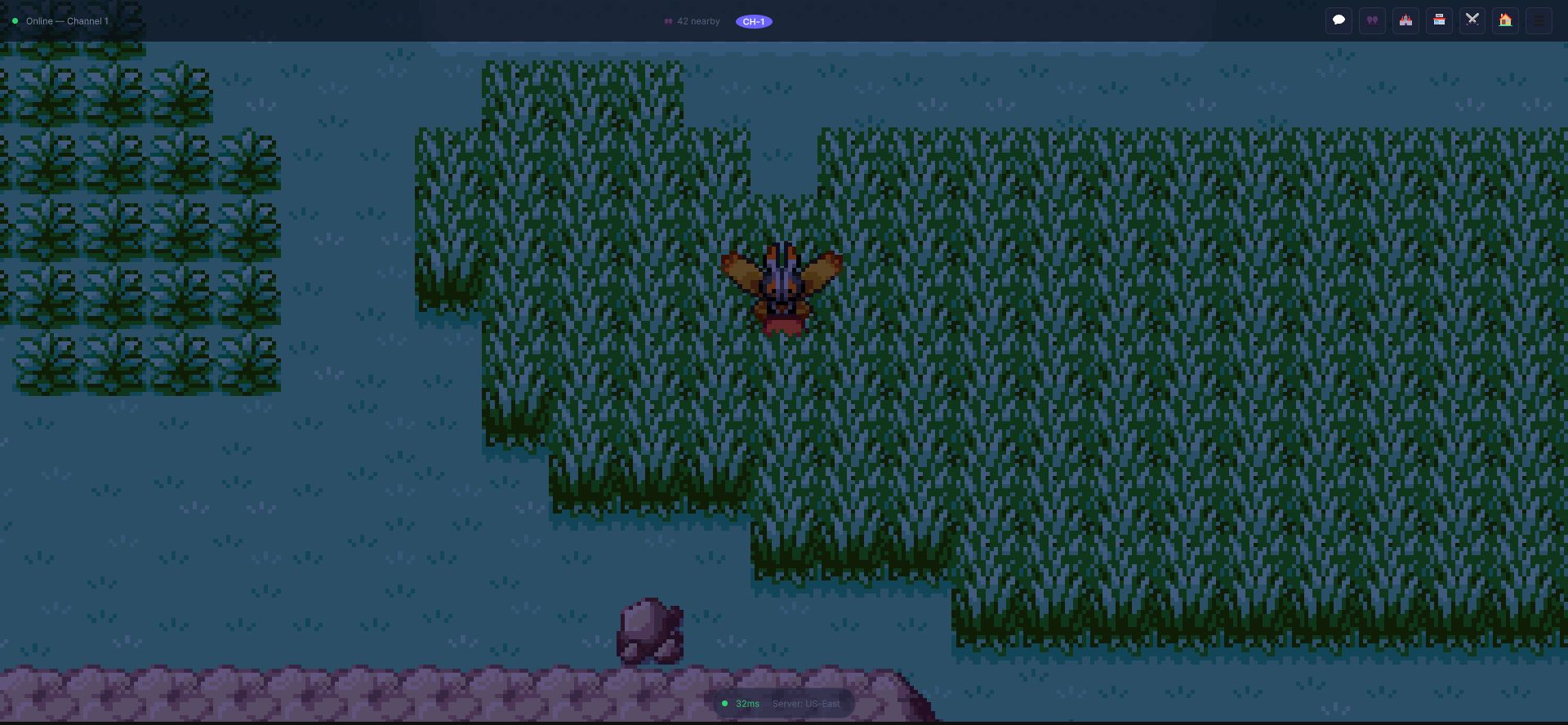
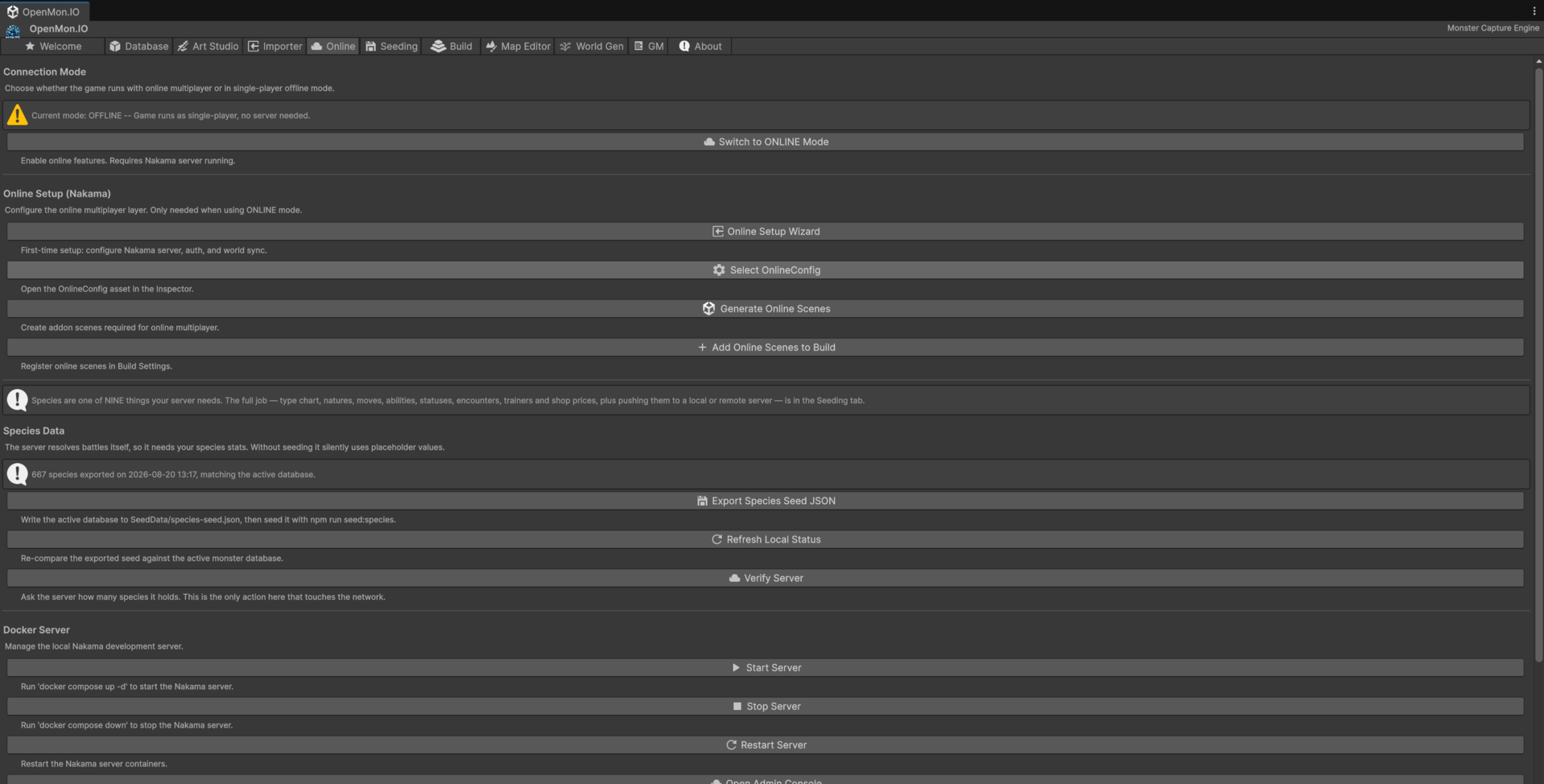
The channel strip, the nearby-player count and the latency badge are not a mock-up: that is the client connected to a Nakama server, and the Hub tab below is where you point it at yours.
OpenMon Pro, Source and Studio ship with 25 integrated services that provide the backend for a monster capture MMO -- powered by Nakama, an open-source game server used by studios worldwide.
Available in the Pro, Source and Studio editions.
What You Get
The Pro edition extends OpenMon's single-player engine with a multiplayer backend. Each service is a public property of NakamaManager.Instance, and each has its own guide:
| Module | Services (properties of NakamaManager) | Guide |
|---|---|---|
| Authentication | Auth, SessionMgr -- email, device and SSO login (Discord, Google, Apple) with session persistence and auto-reconnect | Authentication |
| World | WorldSync, Channels -- real-time shared overworld, one match per map, server-side area of interest, channels | World Sync |
| Battles | Matchmaker, PvpBattle, Spectator, Raids -- server-authoritative wild and PvP battles, ELO matchmaking, spectating, 5-player raids | PvP Battles, Battle Authority |
| Social | Chat, Guilds, Friends, Trade -- channels and whispers, guilds with roles, friends and presence, atomic player-to-player trading | Social |
| Economy | Wallet, Shop, GTL, Gts, Inventory -- server-authoritative currency, shops, the Global Trade Link marketplace and the Global Trade Station | Economy |
| Housing | Housing, BaseSync, Gym -- Secret Bases others can visit, live co-presence inside a base, player gyms to challenge | Player Housing |
| Persistence | CloudSave -- server-side save storage with conflict detection | LiveOps |
| LiveOps | Events, Leaderboards, Achievements, Mods -- live events, rankings, achievements, mod loading | LiveOps |
| Operations | AntiCheatManager, GameMasterService -- anti-cheat checks, and a game-master console to test and operate a live server | GM Mode |
| Expression | Emotion balloons shown to the players around you | Online Emotes |
| Monster gifts | Starters and NPC gifts minted by the server | Monster Gifts |
Architecture Overview
┌─────────────┐     WebSocket      ┌──────────────┐
│ Unity Client │ ◄──────────────► │ Nakama Server │
│  (OpenMon)   │                   │  (Docker)     │
└─────────────┘                    └──────┬───────┘
                                          │
                                   ┌──────┴───────┐
                                   │  PostgreSQL   │
                                   │  (Game Data)  │
                                   └──────────────┘
The client connects to Nakama via WebSockets for real-time communication. All authoritative game logic runs server-side via RPCs (Remote Procedure Calls); the overworld runs in a Go plugin. PostgreSQL stores persistent data.
Getting Started
Step 1: Set Up the Server
The server ships as a bundle. In the Hub's Online tab press Extract Server Bundle, then start it with Docker:
cd path/to/OpenMon-Nakama-Server
docker compose up -d postgres nakama
The bundle's docker-compose.yml is preconfigured with Nakama and PostgreSQL. This gives you a local development server in about a minute. The Hub's Online tab also has Start Server, Stop Server and Show Logs buttons for the Docker stack.
For production, you can deploy to any cloud provider. Nakama supports:
- Heroic Cloud (managed, easiest)
- AWS / GCP / Azure (self-hosted, full control)
- DigitalOcean / Hetzner (budget-friendly VPS)
See Online Setup for the details.
Step 2: Configure the Client
In Unity, set up the OnlineConfig asset:
- Open the OpenMon Hub (
Tools > MCE > OpenMon Hub) → Online tab → Online Setup Wizard - Set your server URL (default:
127.0.0.1:7350for development) - Set the server key (default:
defaultkeyfor development) - The config asset lives in a
Resourcesfolder (Assets/Resources/OnlineConfig.asset) and is loaded automatically
Step 3: Enable Online Mode
Add the MCE_ONLINE scripting define to your project (or use the Setup Online button of the Hub's Welcome tab, which does it for you):
- Edit > Project Settings > Player > Scripting Define Symbols
- Add
MCE_ONLINE - The NakamaManager singleton auto-creates on first scene load
Step 4: Seed the Server
A fresh server does not know your game. Export your data and send it before you judge any battle result: see Species Seeding and the Hub's Seeding tab.
Step 5: Test Connectivity
Enter Play Mode. The console shows lines such as:
[MCE Online] Connected as <DisplayName> (<UserId>)
Open a second Unity editor instance (or build a standalone) to test multiplayer features with two clients.
Building Key Features
PvP Battle System
OpenMon's PvP battles are server-authoritative -- the server validates every move, prevents cheating, and handles disconnections.
// Look for an opponent of a similar rating
await NakamaManager.Instance.Matchmaker.StartSearchAsync(eloRating: 1200, tier: "any");

NakamaManager.Instance.Matchmaker.OnMatchFound += (matchId, opponent) =>
{
    // the authoritative battle then runs in a shared server-owned match
};
The matchmaking system searches within a rating window around the player's ELO and supports cancelling a search. Spectating and 5-player raids are in the same module: see PvP Battles.
Trading System
Server-validated trading prevents item duplication and ensures fair exchanges:
var trade = NakamaManager.Instance.Trade;

string tradeId = await trade.RequestTradeAsync(partnerId);
await trade.OfferMonsterAsync(tradeId, monsterId);
await trade.OfferItemAsync(tradeId, "rare_candy", 5);

// Both players confirm; the server then executes the trade atomically
await trade.ConfirmTradeAsync(tradeId);
Guild System
GuildInfo guild = await NakamaManager.Instance.Guilds.CreateGuildAsync(
    name: "Gym Leaders United", tag: "GLU", description: "Welcome!");

// Guilds have roles (promote, kick), search and member limits
Player Housing
Housing lets players customize personal spaces:
- Build a Secret Base and decorate it from a catalog
- Let friends visit it (a saved snapshot, or live inside the base together)
- Challenge other players' gyms
- See Player Housing for the three layers
Economy and Marketplace
The server-authoritative economy prevents inflation and exploitation:
- Wallet and shops -- the server owns the balance and prices the items
- Global Trade Link (GTL) -- players list monsters and items for sale; other players search and buy, with a listing fee and an expiry
- Global Trade Station (GTS) -- deposit a monster and ask for another kind in return
Game Master Console
Operate and test your live server from the editor or in game, with the verbs of GM Mode.
Scaling for Production
Server Architecture for Scale
The overworld is built to be cheap per player: the server sends each client one batch per tick with only what it can see. The sizing below is a planning guideline, not a promise: measure your own deployment.
| Concurrent Players | Infrastructure |
|---|---|
| 1-500 | Single Nakama + PostgreSQL |
| 500-5,000 | Nakama cluster (2-3 nodes) + managed PostgreSQL |
| 5,000-50,000 | Auto-scaling Nakama cluster + read replicas |
| 50,000+ | Regional clusters + global matchmaking |
Hosting Costs (Estimated)
| Scale | Monthly Cost |
|---|---|
| Development | $0 (local Docker) |
| Soft launch (100 CCU) | $20-50/month (VPS) |
| Live (1,000 CCU) | $100-300/month |
| Growth (10,000 CCU) | $500-2,000/month |
These are rough estimates. Actual costs depend on your server location, data transfer, and database size.
What PokeMMO Built That You Get Included
| Feature | PokeMMO (custom, 10+ years) | OpenMon Online (included) |
|---|---|---|
| Real-time world | Custom Java networking | Nakama match per map, server-side area of interest |
| PvP battles | Custom battle server | Server-authoritative PvP |
| Trading | Custom trade protocol | Validated trading service |
| Chat | Custom chat server | Nakama chat channels |
| Economy | Custom marketplace | GTL / GTS marketplaces + wallet and shops |
| Anti-cheat | Custom server validation | Server-authoritative logic |
| Guilds | Custom guild system | Nakama groups + extensions |
Limitations and Honest Expectations
Building an MMO is hard. OpenMon Pro handles the technical infrastructure, but you still need to:
- Design engaging content -- an MMO needs ongoing content to retain players
- Moderate your community -- chat moderation, ban systems, player reports
- Maintain servers -- updates, monitoring, backups, scaling
- Balance the economy -- real money and in-game currency economics
- Handle operations -- customer support, bug triage, live events
An MMO is a service, not a product. Be prepared for the ongoing commitment.
Next Steps
- Online Setup Guide -- detailed server configuration
- Authentication -- user account systems
- PvP Battles -- competitive battle setup
- Economy -- marketplace and currency
- Social Features -- friends, guilds, chat