Economy System
The economy system provides server-validated currency management, an auction house (Global Trade Link), and server-side shop transactions. These services are initialized automatically by NakamaManager (the Global Trade Station, Gts, and the inventory sync, Inventory, live next to them).
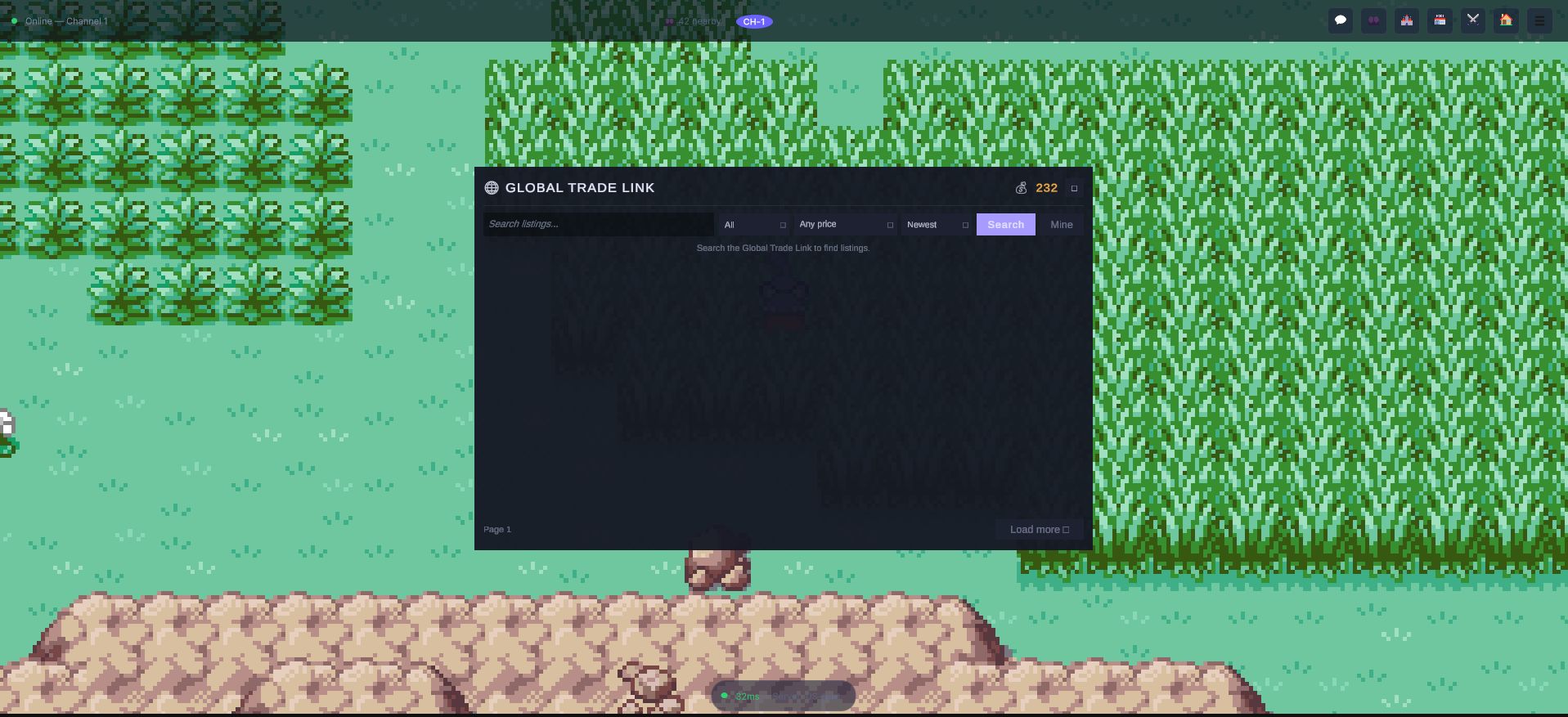
The balance in the corner is not a number the client keeps: it is what the wallet service last heard from the server, which is also the only thing that can change it. The filters (category, price, sort) go into the query — the browser never downloads a catalogue and filters it locally, which is what keeps a large market cheap.
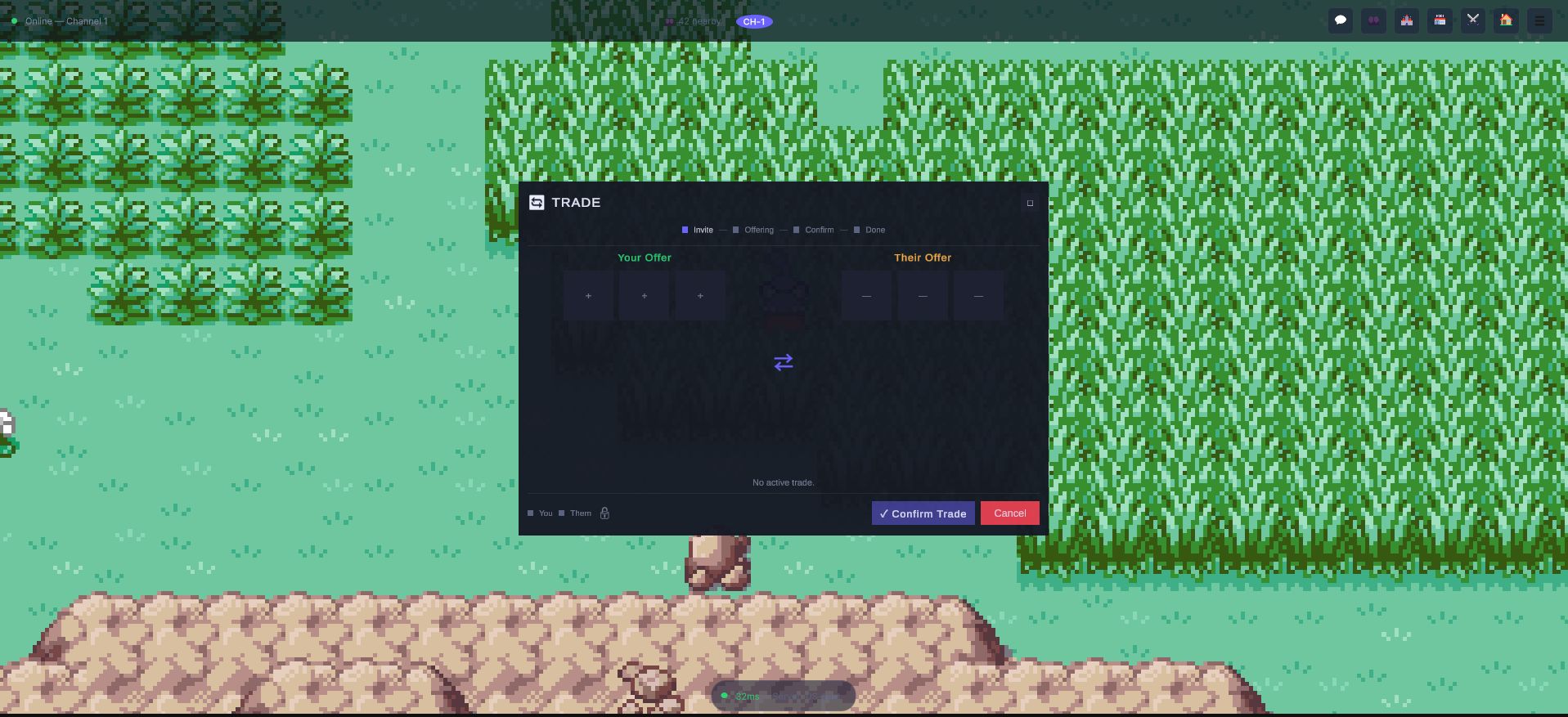
Direct trades run through the four stages named along the top: invite, offering,
confirm, done. Both padlocks at the bottom left have to close before Confirm Trade
means anything, and the server owns the transition — a client that says "done" out of
turn is refused, which is the whole reason the state machine lives on the server side
rather than in the window you are looking at.
Architecture Overview
| Class | File | Responsibility |
|---|---|---|
WalletService | Economy/EconomyServices.cs | Multi-currency balance tracking via Nakama's wallet |
ShopService | Economy/EconomyServices.cs | Server-validated NPC shop buy/sell |
GTLService | Economy/EconomyServices.cs | Global Trade Link auction house for player-to-player trading |
Access all three via NakamaManager.Instance:
var wallet = NakamaManager.Instance.Wallet;
var shop = NakamaManager.Instance.Shop;
var gtl = NakamaManager.Instance.GTL;
WalletService
WalletService manages the player's multi-currency balance. Nakama's server-side wallet system ensures currency changes are atomic and tamper-proof.
Checking Balances
// Refresh from server
await wallet.RefreshBalanceAsync(userId);

// Get balance for a specific currency (defaults to "gold")
long gold = wallet.GetBalance("gold");
long premiumGems = wallet.GetBalance("gems");

// Access the full currency dictionary
Dictionary<string, long> currencies = wallet.Currencies;
Events
wallet.OnBalanceChanged += (long newBalance) => { /* gold changed */ };
wallet.OnCurrencyChanged += (string currencyId, long oldValue, long newValue) =>
{
    Debug.Log($"{currencyId}: {oldValue} -> {newValue}");
};
Server Authority
When OnlineConfig.EnableServerAuthority is true, all money changes go through the OnlineCommandBridge:
// This is called internally by CommandGraph nodes (GivePlayerMoney, etc.)
bool approved = await bridge.RequestGiveMoneyAsync(amount: 500, source: "npc_reward");
The server validates the source and amount before applying the change. This prevents money duplication exploits.
ShopService
ShopService handles NPC shop transactions with server-side validation.
Buying Items
bool success = await shop.BuyFromShopAsync(
    shopId: "pokemart_viridian",
    itemId: "potion",
    quantity: 5);
The server validates:
- The shop exists and contains the item.
- The player has enough currency.
- The item is available (not out of stock for limited items).
Selling Items
long revenue = await shop.SellToShopAsync(
    itemId: "nugget",
    quantity: 1);
// revenue = the amount of gold received
The server validates the player actually has the item in their inventory before crediting the currency.
Global Trade Link (GTL)
The GTL is an auction house system that allows players to list monsters and items for sale to other players globally. It functions similarly to the GTS/GTE in popular monster capture games, but with full item support and listing fees.
Configuration
| Config Field | Default | Description |
|---|---|---|
GTLListingFee | 0.05 (5%) | Fee percentage deducted from listing price |
GTLListingDurationHours | 48 | Hours before a listing expires |
MaxGTLListings | 20 | Maximum active listings per player |
Listing a Monster
GTLListing listing = await gtl.ListMonsterAsync(
    monsterId: "monster_uuid_here",
    price: 50000);

// listing.Id -- unique listing ID
// listing.Fee -- the listing fee (price * GTLListingFee)
// listing.ExpiresAt -- Unix timestamp when the listing expires
// listing.Status -- GTLListingStatus.Active
Listing an Item
GTLListing listing = await gtl.ListItemAsync(
    itemId: "rare_candy",
    quantity: 10,
    price: 25000);
Searching the GTL
var filter = new GTLSearchFilter
{
    Query = "fire",
    Type = GTLItemType.Monster,
    MinPrice = 1000,
    MaxPrice = 100000,
    SortBy = "price",
    Ascending = true,
    Page = 0,
    PageSize = 20
};

List<GTLListing> results = await gtl.SearchAsync(filter);
GTLSearchFilter supports:
Query-- text search on item/monster name.Type-- filter byGTLItemType.MonsterorGTLItemType.Item.MinPrice/MaxPrice-- price range filter.SortBy-- sort field name.Ascending-- sort direction.Page/PageSize-- pagination (default page size: 20).
Buying a Listing
bool success = await gtl.BuyListingAsync(listingId);
Cancelling a Listing
bool cancelled = await gtl.CancelListingAsync(listingId);
Viewing Your Listings
List<GTLListing> myListings = await gtl.GetMyListingsAsync();
GTL Events
gtl.OnListingSold += (GTLListing listing) =>
{
    Debug.Log($"Your {listing.ItemName} sold for {listing.Price}!");
};

gtl.OnListingExpired += (GTLListing listing) =>
{
    Debug.Log($"Listing for {listing.ItemName} expired.");
};
GTL Data Model
The GTLListing class contains:
| Field | Type | Description |
|---|---|---|
Id | string | Unique listing ID |
SellerId | string | Seller's user ID |
SellerName | string | Seller's display name |
Type | GTLItemType | Monster or Item |
ItemId | string | ID of the monster or item |
ItemName | string | Display name |
Quantity | int | Quantity (for items) |
Price | long | Asking price |
Fee | long | Listing fee deducted |
Status | GTLListingStatus | Active, Sold, Expired, or Cancelled |
ExpiresAt | long | Unix timestamp (milliseconds) |
CreatedAt | long | Unix timestamp (milliseconds) |
Client UI
The GTL ships with a real, wired client UI. GTLBrowserUgui
(Assets/OpenMon/Online/UI/UGUI/GTLBrowserUgui.cs) is a UGUI auction-house browser
that calls NakamaManager.Instance.GTL directly — SearchAsync,
GetMyListingsAsync, BuyListingAsync — and subscribes to OnListingSold. It
falls back to an honest "Offline — the GTL is unavailable" state when not connected.
Alongside the bool-returning methods documented above, GTLService also exposes
*WithResultAsync variants (SearchListingsAsync, BuyListingWithResultAsync,
CancelListingWithResultAsync, …) that return OnlineResult<T> so callers can
surface a server error instead of a bare false.
GTS — Global Trade Station
A second exchange, the GTS, is a monster-for-monster asynchronous trade. GtsService (NakamaManager.Instance.Gts, in Economy/EconomyServices.cs) is its client transport over the server RPCs gts_deposit, gts_search and gts_withdraw:
| Method | RPC | What it does |
|---|---|---|
DepositAsync / DepositWithResultAsync | gts_deposit | Escrow a roster monster out of the player's roster and post what is wanted in return (a GtsWantSpec). The server immediately looks for a deposit that satisfies both sides: if there is one, the two monsters swap atomically in that same call; otherwise the deposit rests on the board |
SearchAsync / SearchWithResultAsync | gts_search | Read the board of active, unexpired deposits (read-only: nothing is swapped here). What you offer and what you want may pre-filter the board |
WithdrawAsync / WithdrawWithResultAsync | gts_withdraw | Reclaim one of your own active deposits |
Like the GTL, each operation has a UI-facing overload that degrades to an empty list or false, and a *WithResultAsync overload returning an OnlineResult<T> with the server's error. The matchable card of a monster is derived server-side from the escrowed monster, so no client-sent card is trusted. IGtsTransport is the interface behind it, so a UI can be tested against a fake.
GtsBrowserUgui (Assets/OpenMon/Online/UI/UGUI/GtsBrowserUgui.cs) is the UGUI front end: it assembles a GtsWantSpec from its filter controls and uses the pure GtsMonsterMatcher (no Unity, no Nakama) to filter the deposit board.
Economy Balancing
MCE's economy design includes several built-in currency sinks:
- GTL listing fees (default 5%) -- removes currency from circulation with every trade.
- Server-validated shop prices -- the server controls buy/sell ratios, preventing arbitrage.
- Battle rewards controlled server-side -- the server determines EXP, money, and item drops.
- Anti-cheat inventory auditing -- the
InventoryAuditordetects item duplication and quantity mismatches (see the Anti-Cheat section for details).
Anti-Fraud Measures
When EnableServerAuthority is active:
- All currency changes go through
OnlineCommandBridge.RequestGiveMoneyAsync()which calls themce_give_moneyRPC. The server validates the source (battle reward, shop sale, quest, etc.) before applying. - All item changes go through
OnlineCommandBridge.RequestGiveItemAsync()which calls themce_give_itemRPC. - The
InventoryAuditortakes snapshots after every validated action and compares them against client-reported inventories. Mismatches triggerAuditViolationevents. - The
ActionRateLimiterprevents rapid-fire buy/sell exploits (default 0.3s as configured in AntiCheatManager; class default is 0.5s).