Live Operations
Live Operations covers time-limited events, leaderboards, achievements, cloud saves, automated backups, and mod support. These systems enable ongoing content delivery and player engagement after launch.
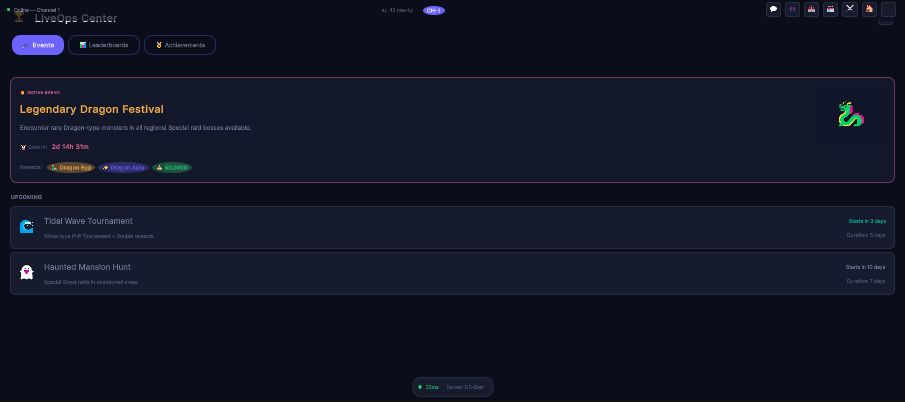
Events, leaderboards and achievements in one screen. The countdown on the active event is server time, not the client's clock -- which is what stops a player from ending an event early by changing their system date.
Architecture Overview
| Class | File | Responsibility |
|---|---|---|
EventService | Persistence/PersistenceAndSystems.cs | Seasonal/time-limited event management |
LeaderboardService | Persistence/PersistenceAndSystems.cs | Ranked leaderboards with score submission |
AchievementService | Persistence/PersistenceAndSystems.cs | Achievement tracking and unlock system |
CloudSaveService | Persistence/PersistenceAndSystems.cs | Cloud save upload/download with conflict detection |
BackupScheduler | AntiCheat/AntiCheatManager.cs | Automated periodic cloud backups |
ModLoader | Persistence/PersistenceAndSystems.cs | Community mod loading at runtime |
Access via NakamaManager.Instance:
var events = NakamaManager.Instance.Events;
var leaderboards = NakamaManager.Instance.Leaderboards;
var achievements = NakamaManager.Instance.Achievements;
var cloudSave = NakamaManager.Instance.CloudSave;
var mods = NakamaManager.Instance.Mods;
Event Service
EventService manages time-limited live events (community days, seasonal content, special encounters).
Fetching Active Events
List<LiveEvent> activeEvents = await events.GetActiveEventsAsync();

foreach (var evt in activeEvents)
{
    // evt.Id -- unique event ID
    // evt.Name -- display name
    // evt.Description -- event details
    // evt.StartTime -- Unix timestamp (ms) when event starts
    // evt.EndTime -- Unix timestamp (ms) when event ends
    // evt.RewardData -- JSON-encoded reward configuration
}
Event Lifecycle
events.OnEventStarted += (LiveEvent evt) =>
{
    Debug.Log($"Event started: {evt.Name}");
    // Show event banner, enable event encounters, etc.
};

events.OnEventEnded += (string eventId) =>
{
    Debug.Log($"Event ended: {eventId}");
    // Remove event content, distribute participation rewards
};
LiveEvent Data Model
| Field | Type | Description |
|---|---|---|
Id | string | Unique event identifier |
Name | string | Display name |
Description | string | Event description text |
StartTime | long | Start timestamp (Unix ms) |
EndTime | long | End timestamp (Unix ms) |
RewardData | string | JSON-encoded reward configuration |
Events are configured server-side through the Nakama console. The client polls for active events and reacts to start/end notifications.
Leaderboard Service
LeaderboardService provides ranked leaderboards with score submission and ranking queries.
Submitting Scores
await leaderboards.SubmitScoreAsync(
    boardId: "pvp_season_1",
    score: 1850);

await leaderboards.SubmitScoreAsync(
    boardId: "dex_completion",
    score: 151);
Querying Rankings
// Get top players
List<LeaderboardEntry> top100 = await leaderboards.GetTopPlayersAsync(
    boardId: "pvp_season_1",
    limit: 100);

foreach (var entry in top100)
{
    // entry.Rank, entry.DisplayName, entry.Score, entry.UserId
}

// Get my rank
LeaderboardEntry myRank = await leaderboards.GetMyRankAsync("pvp_season_1");
Refreshing Data
await leaderboards.RefreshAsync();
LeaderboardEntry Data Model
| Field | Type | Description |
|---|---|---|
UserId | string | Player's Nakama user ID |
DisplayName | string | Player's display name |
Score | long | Score value |
Rank | int | Position on the leaderboard |
Leaderboards support seasonal resets -- create new board IDs per season (e.g., pvp_season_2) and archive old ones.
Achievement Service
AchievementService tracks player accomplishments with progress support.
Listing Achievements
List<Achievement> all = await achievements.GetAchievementsAsync();

foreach (var ach in all)
{
    // ach.Id, ach.Name, ach.Description
    // ach.CurrentProgress, ach.MaxProgress
    // ach.IsUnlocked, ach.RewardData
}
Unlocking Achievements
// Instant unlock
await achievements.UnlockAsync("first_capture");

// Progress-based (e.g., "Catch 100 monsters")
await achievements.UpdateProgressAsync("centurion_catcher", progress: 47);
Achievement Events
achievements.OnAchievementUnlocked += (Achievement ach) =>
{
    Debug.Log($"Achievement unlocked: {ach.Name}!");
    // Show unlock popup, grant reward from ach.RewardData
};
Refreshing Data
await achievements.RefreshAsync();
Achievement Data Model
| Field | Type | Description |
|---|---|---|
Id | string | Unique achievement ID |
Name | string | Display name |
Description | string | Achievement description |
CurrentProgress | int | Current progress value |
MaxProgress | int | Target progress for completion |
IsUnlocked | bool | Whether the achievement is completed |
RewardData | string | JSON-encoded reward configuration |
Cloud Save Service
CloudSaveService bridges MCE's existing JSON-based save system with Nakama server storage, enabling cross-device play.
Uploading Saves
string saveJson = GetLocalSaveJson(); // Your save serialization
bool success = await cloudSave.UploadSaveAsync(saveJson);

// cloudSave.HasCloudSave -- true after successful upload
// cloudSave.LastSyncTimestamp -- Unix timestamp of last sync
Downloading Saves
string saveJson = await cloudSave.DownloadSaveAsync();
// Deserialize and apply to local game state
Conflict Detection
When saving, the system can detect conflicts between local and cloud data:
SaveConflictInfo conflict = await cloudSave.CheckSaveConflictAsync(localTimestamp);

if (conflict.HasConflict)
{
    // conflict.CloudTimestamp vs conflict.LocalTimestamp
    // Present UI to let the player choose which save to keep
}
Specialized Sync
// Sync PC Storage boxes (monster storage)
await cloudSave.SyncPCStorageAsync(pcStorageJson);

// Sync progression data (badges, Pokedex, quests)
await cloudSave.SyncProgressionAsync(progressionJson);
Backup Scheduler
BackupScheduler is a MonoBehaviour that creates periodic automated cloud backups.
Configuration
| Field | Default | Description |
|---|---|---|
autoSaveIntervalMinutes | 5 | Minutes between automatic backups |
maxBackupSlots | 10 | Maximum backup history size (FIFO rotation) |
What it backs up
A backup uploads what the scheduler's SaveDataProvider (a Func<string>) returns. When you do not set one, the scheduler uses LocalSaveDataProvider, which reads the most recent SavegameManager save on disk. If there is no provider, no save on disk or no connection, the backup is skipped and OnBackupFailed fires: nothing is uploaded and no history entry is written.
Manual Backup
backupScheduler.CreateBackupAsync();
Restoring from Backup
string saveJson = await backupScheduler.RestoreBackupAsync(backupId);
Backup Events
backupScheduler.OnBackupCreated += (BackupEntry entry) =>
{
    // entry.Id, entry.Timestamp, entry.Type, entry.SizeBytes
};

backupScheduler.OnBackupFailed += (string reason) =>
{
    Debug.LogWarning($"Backup failed: {reason}");
};
Backup Types
| Type | Description |
|---|---|
Auto | Periodic automatic backup |
Manual | Player-initiated backup |
PreBattle | Snapshot before entering a battle |
PreTrade | Snapshot before executing a trade |
Mod Support
ModLoader enables community-created content packs to be loaded at runtime. This is controlled by OnlineConfig.EnableModSupport (default: false).
Loading Mods
Installed mods are loaded automatically during connection when mod support is enabled:
await mods.LoadInstalledModsAsync();
Installing and Removing Mods
bool installed = await mods.InstallModAsync("/path/to/mod.zip");
bool removed = await mods.UninstallModAsync(modId);
Listing Loaded Mods
IReadOnlyList<ModManifest> loadedMods = mods.LoadedMods;

foreach (var mod in loadedMods)
{
    // mod.Id, mod.Name, mod.Author, mod.Version
    // mod.Description, mod.IsEnabled
    // mod.ContentTypes -- e.g., ["monsters", "maps", "items", "moves"]
}
Mod Events
mods.OnModLoaded += (ModManifest manifest) =>
{
    Debug.Log($"Mod loaded: {manifest.Name} v{manifest.Version}");
};

mods.OnModError += (string modId, string error) =>
{
    Debug.LogError($"Mod error ({modId}): {error}");
};
ModManifest Data Model
| Field | Type | Description |
|---|---|---|
Id | string | Unique mod identifier |
Name | string | Display name |
Author | string | Mod author |
Version | string | Semantic version |
Description | string | Mod description |
ContentTypes | string[] | Types of content: "monsters", "maps", "items", "moves" |
IsEnabled | bool | Whether the mod is currently active |
Anti-Cheat Systems
The anti-cheat layer runs alongside live ops to maintain game integrity. See the dedicated anti-cheat classes in AntiCheat/AntiCheatManager.cs:
- SpeedValidator: Detects speed hacks by comparing movement speed against a configurable maximum (default: 8 tiles/second).
- ActionRateLimiter: Prevents action spam with a configurable minimum interval (default: 0.3 seconds).
- InventoryAuditor: Detects item duplication and illegal items by comparing client-reported inventory against server snapshots.
- AntiCheatManager: Coordinates all validators with violation thresholds -- 10 violations trigger a kick, 25 trigger a ban.