Monster Capture Engine (MCE)
The Monster Capture Engine (MCE) by OpenMon.IO is a production-ready Unity engine for building monster capture RPGs. Whether you are creating the next Temtem, Coromon, or Cassette Beasts, MCE provides the complete foundation so you can focus on what makes your game unique.
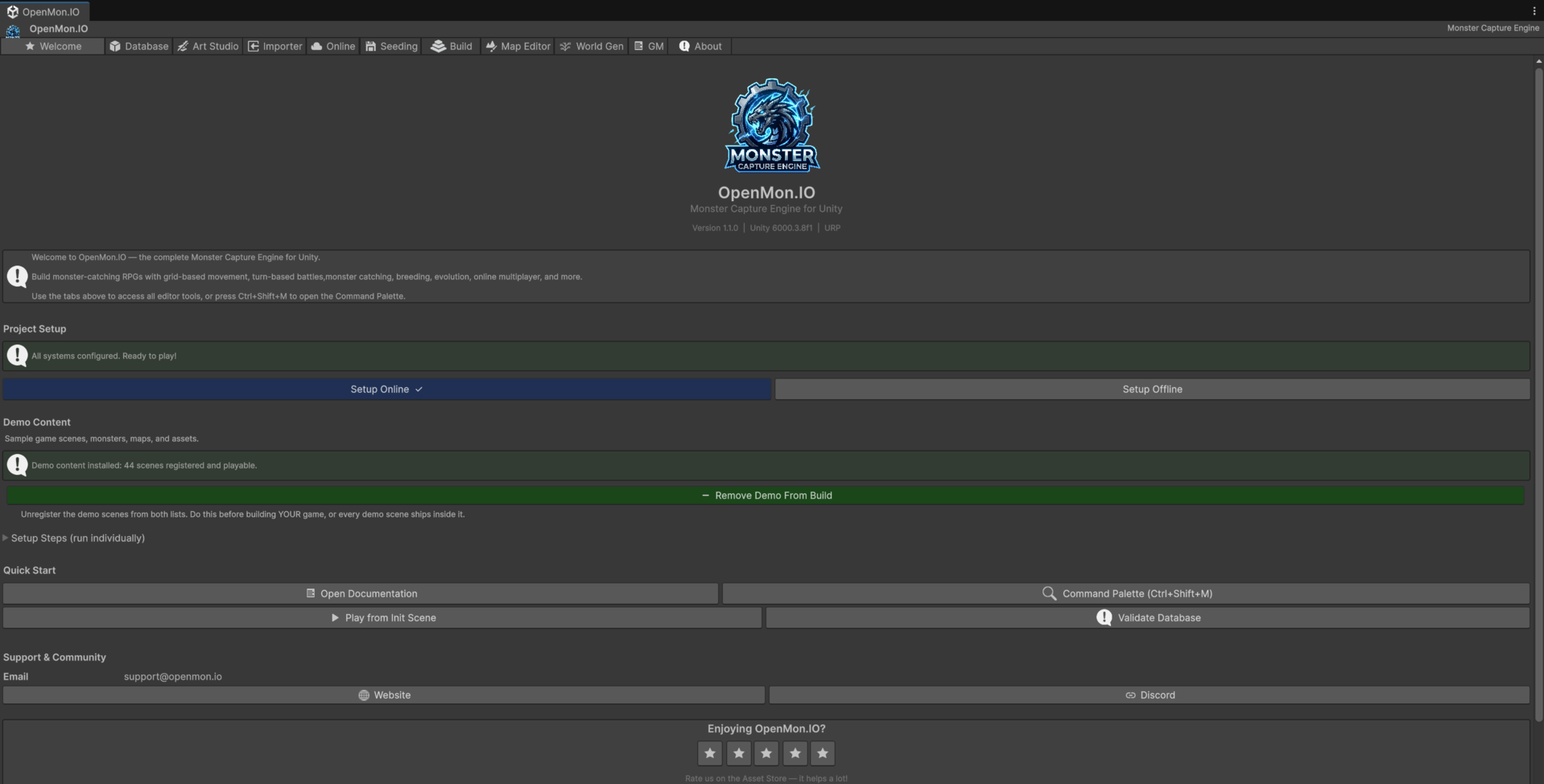
The Hub is the front door: every tool in this documentation is reachable from those tabs, and nothing in MCE requires hunting through Unity's menu bar to find it.
What Can You Build?
MCE is designed for any game in the monster capture genre:
- Single-player RPGs with grid-based overworlds, turn-based battles, and full progression systems.
- MMORPGs with real-time world sync, PvP matchmaking, trading, and guilds (with MCE Online).
- Fan games imported directly from Pokemon Essentials projects (with the Essentials Importer) — proven end-to-end against a full v21.1 project (898 species converted with zero errors).
- Hybrid games that blend monster capture with other genres using the modular architecture.
Feature Overview
| Feature | Details |
|---|---|
| Monsters | The engine ships no monsters of its own: the MIT Licensed Demo (a separate download) brings 667 monster entries, and you add unlimited custom species, forms and variants, breeding, egg hatching |
| Moves | The MIT Licensed Demo (a separate download) brings 640+ moves, with Physical / Special / Status categories and full Gen V+ damage formulas |
| Battle System | Turn-based with 15+ modular components, wild / trainer / PvP modes, battle items, capture mechanics |
| Battle Tower | Ephemeral challenge ladder with generated opponents and wallet payouts |
| Player-Built Spaces | Secret Bases and player-owned Gyms: instanced interiors, a persistent decoration layer, custom gym team / badge / dialog, and challenges from other players (online) |
| Battle AI | Pluggable strategy pattern with Random, Effective, and ML-Agents-based AI included |
| Evolution | 37 evolution types: level, item, trade, friendship, location, time-of-day, stat-based, and more |
| Type System | Full type effectiveness chart, dual types, customizable via Type Chart Editor |
| World | Grid-based tile movement, multi-map transitions, bridges, waterfalls, slippery tiles, ledges |
| Encounters | Configurable encounter tables, time-of-day, terrain-based (grass, water, cave, fishing) |
| Events | CommandGraph visual scripting for NPCs: dialogs, branches, shops, quests, cutscenes, warps |
| Save System | JSON serialization into named saves with atomic writes, versioning and auto-save |
| Quest System | 11 objective types, 6 reward types, prerequisites, time limits, repeatable quests |
| UI | Complete UGUI system: battle HUD, menus, bag, dex, shops, dialog boxes, options |
| Emotes | 14 built-in emotion balloons: player hotkeys, a script node, the follower's heart and, with MCE Online, balloons other players see |
| Audio | BGM, BGS, SE, ME channels with AudioManager |
| Localization | Multi-language support with runtime language switching |
| Rendering | URP shaders, time-of-day lighting, weather effects |
| SDK | Clean public API surface (IMonsterCaptureEngine) for stable integrations (Indie and above; the Starter has no public API) |
Editions
MCE comes in five editions. Pricing is announced on openmon.io, where every edition is sold.
| Edition | Includes |
|---|---|
| Starter | Free. The engine as compiled DLLs with the API closed (no public SDK API, no source, no XML documentation) and visual scripting. Limited to 77 monsters, 301 moves and 74 abilities (the follower sprites share the same limit of 77 species), with a fixed-length OpenMon splash and a permanent watermark. It comes with its own demo of 77 species (separate download). No importer, no online |
| Indie | Compiled DLLs with a readable public API and XML documentation, unlimited species, no watermark, optional splash, and the Essentials Importer (compiled) |
| Pro | Indie + the Nakama MMORPG layer (compiled client), PvP, trading, guilds, secret bases and player gyms, and the server |
| Source | Pro with the full C# source and the right to customize it |
| Studio | Source + a private repository with a continuously updated main, experimental features, priority support, and the cartridge importers as scripts |
The demos are not inside any edition. The full MIT Licensed Demo is a separate download for Indie and every edition above it. The Starter only works with its own demo (or with a game of your own that stays within those limits): it turns a bigger demo down and tells you that demo belongs to the Indie edition.
- Trying the engine or building a small prototype? Start with Starter.
- Building a commercial single-player game, or importing a Pokemon Essentials project? Indie gives you the engine and the importer.
- Building an online multiplayer game? Pro adds the complete Nakama backend.
- Deeply customizing internals? Source (and Studio for the private repository and the cartridge importers).
Quick Links
- Installation Guide -- Get MCE running in your Unity project in minutes.
- Create Your First Monster -- Build a custom monster from scratch.
- Set Up Your First Battle -- Configure an encounter zone and test combat.
- CommandGraph Events -- Create NPC behavior with visual scripting.
- Public API -- Extend MCE through the stable SDK surface (Indie and above).
- Source Architecture -- Deep dive into engine internals (Source and Studio editions).
Requirements
- Unity 6 LTS (6000.3.x or later)
- Universal Render Pipeline (URP)
- Windows, macOS, or Linux editor
- Target platforms: Windows, macOS, Linux, Android, iOS, WebGL