Installation
This guide walks you through importing MCE into a Unity project and getting it running.
Prerequisites
- Unity 6 LTS (
6000.3.8f1or later) installed via Unity Hub. - A new project created with the "Universal 2D" or "Universal 3D" template.
That is the whole list. There is nothing to buy or install first.
Earlier versions of this page told you to install DOTween Free before importing.
That is no longer true and you can skip it: the animation layer is NovaMotion,
an MCE component that ships with the engine behind OpenMon's own
OpenMon.Foundation.Tweening API, so the engine compiles with nothing but the URP
template. An edit-mode test enforces it — no engine file may import
DG.Tweening, so the dependency cannot come back by accident.
If you already have DOTween in the project it does no harm; the engine simply does not use it.
Import into a blank project. Both URP templates already include URP, the Input System and TextMeshPro. Neither includes Cinemachine or the VFX Graph, and the 3D template also lacks 2D Tilemap Extras and 2D Sprite: the installer in Step 2 adds whatever is missing.
Step 1: Import the .unitypackage
- In Unity:
Assets > Import Package > Custom Package. - Select your OpenMon
.unitypackagefile for your edition. - Click Import — import ALL files.
- Wait for Unity to compile scripts (~30-60 seconds).
Step 2: Automatic Setup (Two Dialogs)
After compilation, two dialogs appear automatically:
Dialog 1: "OpenMon — Install Dependencies"
The PackageDependencyInstaller detects missing UPM packages and offers to install them:
| Package | Purpose |
|---|---|
com.unity.cinemachine | Battle camera system |
com.unity.2d.tilemap.extras | SiblingTile, RuleTile, autotiles |
com.unity.2d.sprite | Sprite editor tools (Importer) |
com.unity.render-pipelines.universal | URP (usually already present) |
com.unity.inputsystem | Input handling (usually already present) |
com.unity.visualeffectgraph | Weather, climbing dust and battle effects (every .vfx of the engine and the demo) |
Click "Install All". Unity will install the packages and recompile.
After package installation, TMP Essential Resources (fonts, shaders, sprites) are auto-imported from com.unity.ugui.
The installer uses [InitializeOnLoad] in an isolated assembly (OpenMon.Setup) with zero external references. It tracks state via a file in Library/ (per-project, not global). If you skip the dialog, use Tools > MCE > Setup > Re-check Package Dependencies to retry.
Dialog 2: OpenMon Hub — Setup Status
Open the Hub via Tools > MCE > OpenMon Hub (or Ctrl+Shift+H). The Welcome tab shows a GREEN/RED setup status indicator.
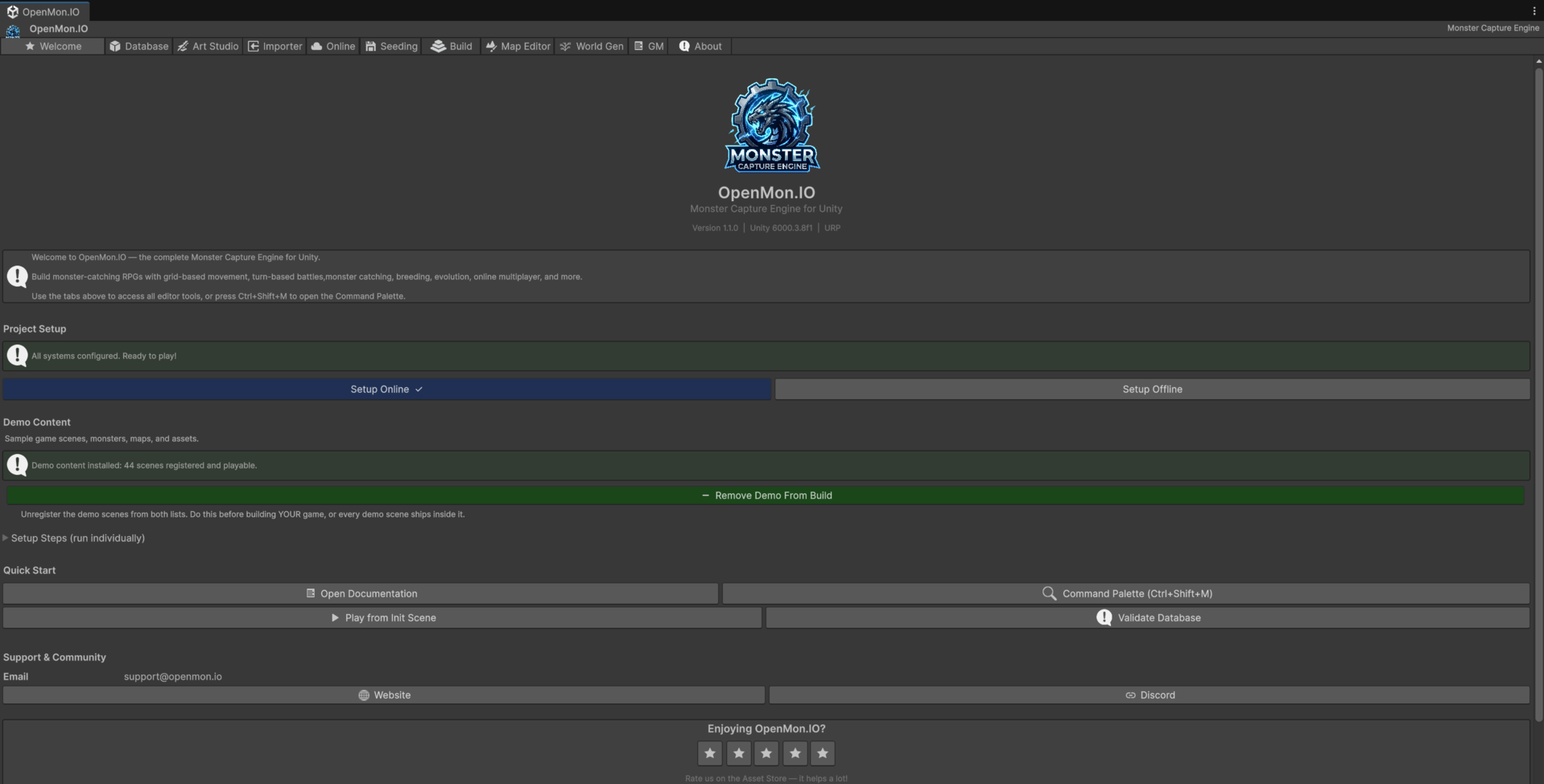
The two buttons under the status bar pick the mode, and the blue one is the mode you are in — above, the project is Offline. Pressing the other one switches: it flips the scripting define, registers the scenes that mode needs, points the config at the right place, and seeds the data. See The OpenMon Hub for the rest of the tabs.
If RED, click "Run Full Setup" which runs ProjectQuickSetup:
| Configuration | What it does |
|---|---|
| Custom Layers | Creates BattleElement (6), Camera (7), EvolutionStage (8), MapScreen (9) |
| Render Pipeline | Sets MCERenderPipelineAsset (2D Renderer) for all quality levels |
| Build Settings | Adds detected project/system scenes when present; no edition ships the demo scenes (the demos are separate downloads) |
| Player Settings | Sets company name, product name, resolution |
| TMP Essentials | Imports TextMeshPro resources if not already present |
When all checks pass, the indicator turns GREEN.
Manual re-run: Tools > MCE > Setup > Run Full Quick Setup
Step 3: Play
No edition ships a demo project: the demos are separate downloads (the full MIT Licensed Demo for Indie and every edition above it, and its own 77-species demo for the Starter). Continue with Your First Monster and Your First Battle to author content and press Play.
Included Physical Plugins
MCE bundles its own plugins physically in Assets/Plugins/ (not via UPM):
| Plugin | Path | Why physical? |
|---|---|---|
| NovaInspector | Assets/Plugins/NovaInspector/ | .unitypackage cannot include UPM packages. Without it, 100+ files fail to compile. |
| NovaMotion | Assets/Plugins/NovaMotion/ | The animation (tweening) layer behind OpenMon.Foundation.Tweening. |
| Zenject (Extenject) | Assets/Plugins/MCELibs/ | DI framework used throughout the engine. Included as precompiled DLLs. |
NovaInspector is the engine's own inspector layer — a relicensed derivative distributed exclusively as part of MCE, under the terms in Assets/Plugins/NovaInspector/LICENSE.md. It is not on the Package Manager and does not need to be, so installing a separate inspector package alongside it is redundant.
Project Structure
Assets/
  OpenMon/
    Core/
      Runtime/           # Core engine (battles, monsters, world, saves, UI)
      Editor/            # Editor tools, Hub, Command Palette, Map Editor
      Art/               # Included art assets
      RPSettings/        # URP 2D Renderer configuration
    Foundation/          # Shared framework (DI, audio, localization, toolbar)
    Online/              # Nakama multiplayer layer (Pro, Source and Studio)
    Importer/            # Pokemon Essentials import pipeline (Indie and above)
    Setup/               # PackageDependencyInstaller + ProjectQuickSetup
  Plugins/
    MCELibs/             # Zenject, ExtendedEditor
    NovaInspector/       # Inspector attributes (physical, not UPM)
    NovaMotion/          # Tweening layer (physical, not UPM)
  Resources/             # Runtime-loaded assets (ProjectContext, singletons)
Verify Installation
- Open the Hub:
Tools > MCE > OpenMon Hub(Ctrl+Shift+H). - Continue with Your First Monster and Your First Battle to author content for your own scene.
- Run validator: open the OpenMon Hub (
Tools > MCE > OpenMon Hub) → Database tab → Validate Database — 0 errors, 0 warnings.
Troubleshooting
| Issue | Solution |
|---|---|
| "Install Dependencies" dialog never appeared | Tools > MCE > Setup > Re-check Package Dependencies |
| Hub shows RED setup status | Click "Run Full Setup" button |
Inspector attribute errors (GroupAttribute not found) | The attributes live in Assets/Plugins/NovaInspector/ — check that folder came across with the import |
| Battle sprites invisible | Ensure com.unity.2d.sprite is installed (the installer should handle this) |
| Missing tileset layer | Run Tools > MCE > Setup > Configure Layers |
| TMP text not rendering | Run Tools > MCE > Setup > Run Full Quick Setup to import TMP Essentials |
| Cinemachine errors | Run Tools > MCE > Setup > Re-check Package Dependencies |
Keyboard Shortcuts
| Action | Shortcut |
|---|---|
| OpenMon Hub | Ctrl+Shift+H |
| Command Palette | Ctrl+Shift+M |
| Map Editor: Pencil | B |
| Map Editor: Eraser | E |