World Synchronization
The World Sync system handles real-time player position synchronization, remote player rendering, NPC state coordination, and the channel/instance system. It is built on Nakama's realtime match API, with one match per map.
It has two transports, chosen by OnlineConfig.WorldSyncMode:
| Mode | How positions travel | Who decides who sees whom |
|---|---|---|
Authoritative (the default) | Each client sends its position to the server's overworld match, a Go plugin, which sends every recipient one batch per tick with only what that recipient sees | The server (area-of-interest in the Go match) |
Relayed | The match relays every position to every player of the map | Each client (OnlineConfig.AOIRadius) |
Authoritative is the one that scales to thousands of players; the relay degrades from about a hundred players in one match. The rest of this page says which parts are specific to one mode.
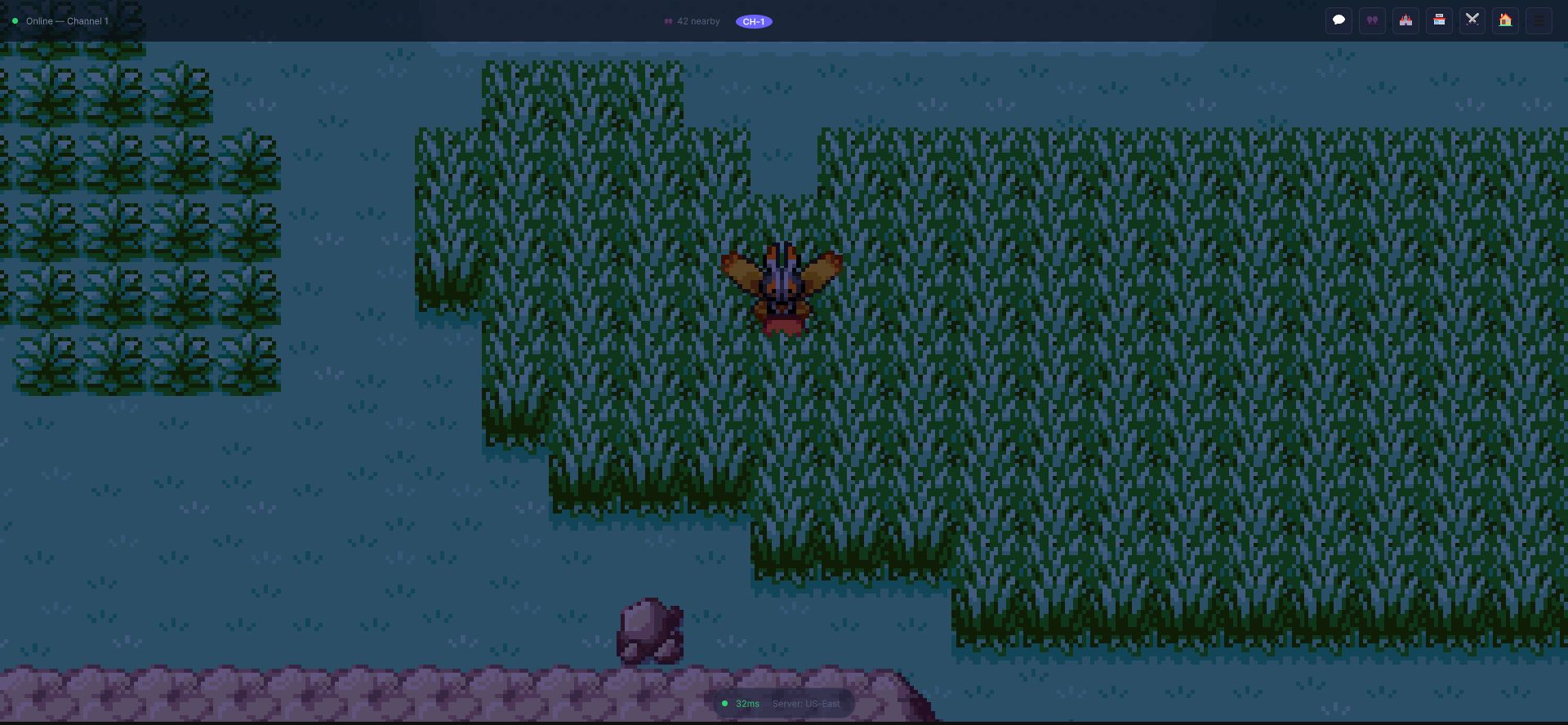
Everything this page describes is visible in that one frame: the channel badge and
Online — Channel 1 at the top left, the nearby-player count that Area-of-Interest
filtering produces, and the latency/server indicator at the bottom. If the count reads zero
when you expect company, AOI is the first thing to check.
Architecture Overview
The world sync stack consists of these components:
| Class | File | Responsibility |
|---|---|---|
WorldSyncService | World/WorldSyncService.cs | Joining the map's match, position broadcasting, match state routing, client-side AOI (relayed mode) |
WorldBatchDecoder | World/WorldBatchDecoder.cs | Decodes the server's per-tick batch (authoritative mode) into the same AOI events |
PlayerNetworkEntity | World/PlayerNetworkEntity.cs | Remote player rendering, interpolation, nameplate, follower sprite |
PlayerSpawnManager | World/PlayerSpawnManager.cs | Spawning/despawning remote player GameObjects based on AOI events, and drawing their emotes |
ChannelManager | World/WorldSyncService.cs | Server channel/instance switching and population queries |
Additionally, NPCSyncService (in World/PlayerNetworkEntity.cs) handles NPC engagement locking across players, and FollowerUpdateData defines the wire protocol for syncing monster followers. Both transports raise the same events, so the code that draws players does not know which one is active.
WorldSyncService
Initialization
WorldSyncService is initialized automatically during NakamaManager.FinalizeConnection():
await WorldSync.InitializeAsync(userId);
This only prepares the service. The match itself is joined as soon as the map is known (the player's scene), and again every time the player changes map:
- Authoritative mode: the client calls the
world_joinRPC with{ "mapId": "<map>" }. The server returns thematchIdof the authoritative match of that map (it creates it if it does not exist yet and refuses a map it has no census for), and the client joins it through the socket. If the server's Go plugin is not loaded the join fails with an error in the console: there is no silent fallback to the relayed transport. - Relayed mode: the client creates or joins the relayed match named
world_<mapId>(WorldSyncService.WorldMatchNameFor).
When the player changes map it leaves the old match, forgets its neighbours (the spawn manager despawns them) and announces its position and follower in the new one.
Match State Protocol
All world sync communication uses Nakama match state messages with the following op codes:
| OpCode | Constant | Direction | Purpose |
|---|---|---|---|
1 | OP_POSITION | client → match | Player position update (x, y, z, direction, map, plus name, look, level, guild, run/bike/swim flags) |
2 | OP_MAP_CHANGE | both | Player changed to a different map |
3 | OP_EMOTE | both | Player emote: see Online Emotes |
4 | OP_FOLLOWER_UPDATE | both | Player's monster follower changed |
10 | WorldBatchDecoder.OP_BATCH | match → client | The per-tick batch of the authoritative match |
Incoming match state is routed by HandleMatchState(). The batch (op 10) is resolved first, because it has no sender: it comes from the match itself. Every other message ignores the local player and is dispatched on its op code. Ops 2, 3 and 4 are events that the server forwards as they come to the other players.
The Authoritative Batch
In authoritative mode the server's overworld match runs at 10 ticks per second and sends one op 10 batch per recipient per tick, containing only what that recipient can see:
- mutual friends first, even if far away;
- then the nearest players within the area-of-interest radius (20 tiles), up to a cap (50 by default,
MCE_WORLD_MAX_VISIBLEon the server); - with hysteresis: a player already visible stays visible until 4 tiles beyond the radius, so the edge does not flicker.
The batch is compact. Players are identified by a per-match slot and a generation that goes up when a slot is reused (so a client never applies to a new player what it knew about the previous one):
{ "t": tick, "k": 1 on a keyframe,
  "p": [[slot, gen, x, y, dir, flags(, z)]],     positions; flags: run=1 bike=2 swim=4
  "s": [[slot, gen, userId, name, look, lvl, guild, gm]],   identity, only when the recipient does not know it yet
  "f": [[slot, gen]] }                           left the recipient's area (or the match)
Idle players are not resent, a player entering the area arrives complete even if idle, and a keyframe every 5 seconds resends positions. WorldBatchDecoder turns the batch into the same OnPlayerEnterAOI, OnPlayerPositionUpdate and OnPlayerExitAOI events the relayed path raises.
The server validates every position it receives inside the loop (see below), so a client cannot place itself anywhere.
Broadcasting Position
The local player's position is sent via UpdateLocalPosition():
NakamaManager.Instance.WorldSync.UpdateLocalPosition(
    position, mapId, direction);
Throttling rules:
- Rate limit: Controlled by
OnlineConfig.PositionSyncRate(default: 10 messages/second). - Dead zone: Positions within 0.01 units of the last synced position are suppressed.
The payload is a JSON-serialized PositionData with the fields x, y, z, dir (the facing direction) and map, plus what the receivers need to draw the player: name (for the nameplate), look (the name of the CharacterType to draw), lvl (the level of the strongest monster of the team), the guild tag, whether the player is a game master, and the run, bike and swim flags.
Follower Broadcasting
When the local player's monster follower changes, broadcast the update:
var data = FollowerUpdateData.FromMonster(monster, form, gender);
NakamaManager.Instance.WorldSync.BroadcastFollowerUpdate(data);

// To clear (hide follower for remote players):
NakamaManager.Instance.WorldSync.BroadcastFollowerUpdate(
    FollowerUpdateData.CreateClear());
FollowerUpdateData includes: speciesId, formIndex, gender, isShiny, isEgg, and nickname. A speciesId of 0 is the "clear" signal.
Follower broadcasts are de-duplicated: same species within a 5-second cooldown window is suppressed.
Area of Interest (AOI) Filtering
AOI filtering prevents the client from processing updates for players too far away.
In authoritative mode the server does the filtering (see the batch above): the client only ever receives the players it should draw, and OnlineConfig.AOIRadius does not change what the server sends.
In relayed mode the client filters. The radius is configured via OnlineConfig.AOIRadius (default: 20 tiles). When a remote player's position update arrives:
- Distance from the local player is calculated.
- If within AOI radius and not already tracked,
OnPlayerEnterAOIfires. - If within AOI,
OnPlayerPositionUpdatefires with(userId, position, direction). - If outside AOI and previously tracked,
OnPlayerExitAOIfires and the player is removed fromNearbyPlayers.
Events
WorldSync.OnPlayerEnterAOI += (OnlinePlayerInfo info) => { /* spawn */ };
WorldSync.OnPlayerExitAOI += (string userId) => { /* despawn */ };
WorldSync.OnPlayerPositionUpdate += (string userId, Vector3 pos, int dir) => { /* move */ };
WorldSync.OnPlayerMapChanged += (string userId, string mapId) => { /* map transition */ };
WorldSync.OnFollowerUpdate += (string userId, FollowerUpdateData data) => { /* follower change */ };
The NearbyPlayers dictionary provides a read-only snapshot:
IReadOnlyDictionary<string, OnlinePlayerInfo> nearby =
    NakamaManager.Instance.WorldSync.NearbyPlayers;
PlayerNetworkEntity
Each remote player is represented by a PlayerNetworkEntity MonoBehaviour on a spawned GameObject. It handles:
Initialization
entity.Initialize(onlinePlayerInfo);
Sets userId, displayName, guildTag, level, battle status, and spectatable flag from OnlinePlayerInfo.
Interpolated Movement
When ReceivePositionUpdate(position, direction) is called:
- If the distance exceeds
snapDistance(default: 5 tiles), the entity teleports instantly (handles map changes/warps). - Otherwise, the entity interpolates toward the target at
interpolationSpeed(default: 10).
Sprite Animation
Remote players use a 4-direction, 4-frame walk cycle (16 sprites total). The animation runs at 0.2 seconds per frame when the entity is moving. When idle, it shows the first frame of the current direction. Left/right flipping is handled via SpriteRenderer.flipX.
Follower Display
Remote player followers are managed through SetFollower(FollowerUpdateData):
- Non-null data with
speciesId > 0shows the follower sprite child. nullorspeciesId == 0callsClearFollower(), hiding the sprite.- The
HasActiveFollowerandCurrentFollowerSpeciesIdproperties expose the current state.
Interaction
Clicking on a remote player fires OnClicked. The IsInBattle property and SetBattleStatus() method track whether the player is in a battle (shows a visual indicator on the nameplate).
PlayerSpawnManager
PlayerSpawnManager is a MonoBehaviour that listens to WorldSyncService AOI events and automatically manages remote player GameObjects.
- OnPlayerEnterAOI: Instantiates the
playerNetworkPrefab(or creates a bare GameObject withSpriteRenderer+PlayerNetworkEntity), callsInitialize(), and registers it. - OnPlayerExitAOI: Destroys the corresponding GameObject and removes it from the tracking dictionary.
- OnPlayerPositionUpdate: Calls
ReceivePositionUpdate()on the corresponding entity.
Access all currently spawned players:
var spawned = spawnManager.GetSpawnedPlayers();
NPC Synchronization
NPCSyncService ensures NPCs have consistent state across all connected players.
Engagement Locking
When a player talks to an NPC in the online world, the NPC is "locked" so other players cannot interact simultaneously:
npcSync.RegisterNPC("npc_nurse_joy", position, "PalletTown");

// Player starts talking
bool engaged = npcSync.TryEngageNPC("npc_nurse_joy", userId);

// Player finishes conversation
npcSync.ReleaseNPC("npc_nurse_joy");
The NPCNetworkState tracks: NpcId, Position, MapId, IsEngaged, EngagedByUserId, and DialogState.
OnNPCStateChanged fires whenever an NPC's engagement state changes.
Channel System
ChannelManager provides an MMO-style channel/instance system, similar to popular monster capture MMOs.
Configuration
| Setting | Default | Description |
|---|---|---|
DefaultChannel | 1 | Channel joined on connect |
MaxChannels | 10 | Maximum channels per world |
Switching Channels
bool switched = await NakamaManager.Instance.Channels.SwitchChannelAsync(3);
int current = NakamaManager.Instance.Channels.CurrentChannel;
Channel values must be between 1 and MaxChannels. The OnChannelChanged event fires on successful switch.
Channel Population
Dictionary<int, int> populations =
    await NakamaManager.Instance.Channels.GetChannelPopulationsAsync();
The OnChannelPopulationUpdate event provides (channel, playerCount) updates.
Bandwidth Optimization
Several mechanisms minimize network traffic:
- Position throttling:
PositionSyncRatelimits messages per second (default: 10/s). - Dead zone filtering: Positions within 0.01 units of the last sync are suppressed.
- AOI culling: In authoritative mode the server sends only what the recipient sees (one batch per tick); in relayed mode only players within
AOIRadiustiles are processed. - Max visible players:
MaxVisiblePlayerscaps the remote players thePlayerSpawnManagerkeeps on screen (default: 50). - Follower dedup: Same-species follower broadcasts within 5 seconds are suppressed.
- Main thread dispatch: All Unity API calls are marshaled to the main thread via
NakamaManager.RunOnMainThread(), preventing cross-thread issues.
Server-Authoritative Teleport Validation
Cross-map warps and teleports are validated server-side through the
mce_validate_teleport RPC (RpcIds.ValidateTeleport), handled by
rpcMceValidateTeleport in src/main.ts. This is a real, enforced check — not a
placeholder — and the server never fakes success.
The client sends a TeleportValidateRequest:
[Serializable]
public class TeleportValidateRequest
{
    public string player_id;    // must equal the caller's session user id
    public string target_scene; // e.g. "pallet_town"
    public float target_x;
    public float target_y;
}
The server applies, in order:
- Identity —
player_idmust equalctx.userId(a forged id or missing session is rejected). - Coordinate sanity —
target_x/target_ymust be finite and within±100000world units (this also rejects a forgedInfinity). - Rate limit — a per-user, storage-backed cap of 30 teleports / 10 s
(bucket
validate_teleport). The client cannot disable it; timing uses server time so the window cannot be forged. - Scene allowlist —
target_scenemust be a KNOWN scene: a small built-in fallback (pallet_town,route_1,viridian_city) OR a record in the poblablescene_registrystorage collection (system user, public-read / server-write). An unknown scene is gated by server-authoritativedev_mode: permissive (allow + warn) on the dev node, fail-closed on the prod-sim node (rejected withcode: "UNKNOWN_SCENE").
On success the server echoes back { success:true, scene, position_x, position_y }.
On any failure it returns { success:false, error, code? } with the requested
scene/position echoed. The client blocks the teleport on any success:false; the
legacy NOT_IMPLEMENTED soft-allow
(OnlineConfig.TeleportSoftAllowWhenUnimplemented) is retained ONLY as a fallback
for an older server that predates this handler.
Server-Side Movement Guard (anti-teleport)
Even ordinary position broadcasts are policed. The same checks run in both transports: in the authoritative match's loop, and in the beforeMatchDataSend hook (src/world/presence.ts) of the relayed match. For each OP_POSITION update the server compares the straight-line distance against the sender's last recorded position using server-measured elapsed time.
- A jump is dropped from the relay only when its distance exceeds
30 u/s × elapsed + 4 u— one that should have gone throughmce_validate_teleport. Legitimate running/biking (bike is<~12 u/s, AOI radius is 20 u) is never false-positived. - Always accepted (and re-baselined): first-seen players, map changes (a
cross-map warp is a different coordinate space), missing coords, and gaps
> 5 s(un-judgeable — this also self-heals any false positive). - On reject the baseline is not advanced, so a teleported position never propagates. Validation fails open (never blocks the relay).
- An oversized payload (over 8 KB) is dropped before anything else.
The server also mirrors each accepted OP_POSITION (map + position) into the
world_presence collection (write-on-change + 60 s refresh), giving the backend an
authoritative map distribution.
Graceful Shutdown
When disconnecting, WorldSyncService.StopSyncAsync() is called automatically:
await WorldSync.StopSyncAsync();
This leaves the world match, clears worldMatchId, and empties the nearbyPlayers dictionary.
Verified with two real clients
Everything above describes how the code is wired. This section records what two built game clients actually did on 2026-09-01, running against a live Nakama server — because a wiring description and a working feature are not the same claim.
This page existed, and was accurate about the code, while players could not see each
other: the remote avatar was instantiated at the world origin instead of at its
owner's position. The log line [Spawn] Remote player spawned: JugadorB was written
in both cases — working and broken — so nothing in the logs contradicted the page.
The fix and the evidence below come from driving the real build. Anything this page claims to work is claimed because a two-client run showed it.
What was driven
Two separate built clients (MCE_Online.exe, one per folder — two instances over the
same folder fail to launch), each with its own log, signed into different accounts,
entering the same map.
Each client sees the other at its real position
client A log:  [Spawn] Remote player spawned: JugadorB en (-2.00, 13.00, 0.00), sprite=SI, activo=True
client B log:  [Spawn] Remote player spawned: NegProg  en (-3.00,  7.00, 0.00), sprite=SI, activo=True
The two coordinates differ, which is the control that matters: if the receiver were echoing its own position instead of the peer's, both lines would read the same.
Movement propagates
While A walked, the server received 32 distinct positions from it, interpolation included:
"x":-1.0,"y":8.87   "x":-1.0,"y":8.43   "x":-1.0,"y":8.00
"x":-1.0,"y":7.67   "x":-1.0,"y":7.27   "x":-1.0,"y":7.00
Position updates are verified on the server, not in the client log: the client does not print every update, so looking for them there would find nothing and prove nothing.
On screen
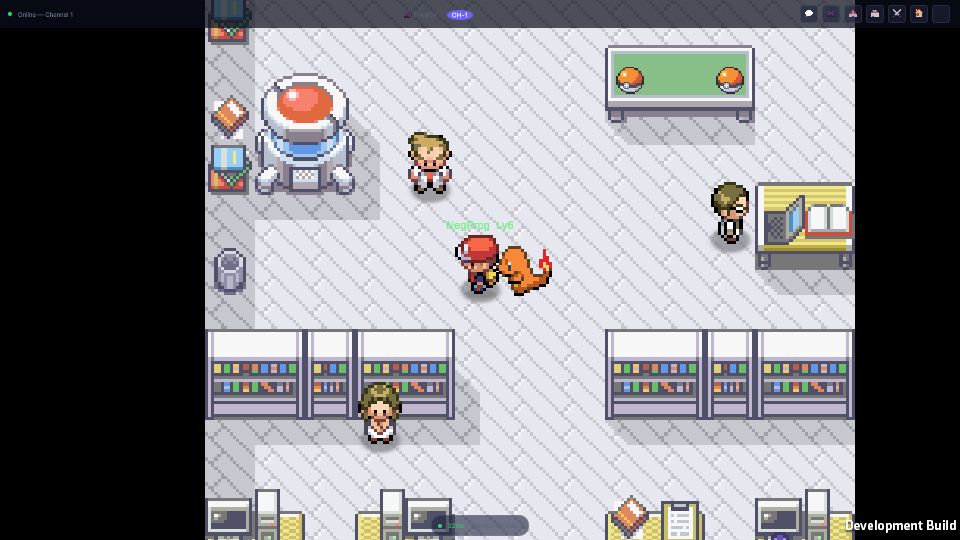
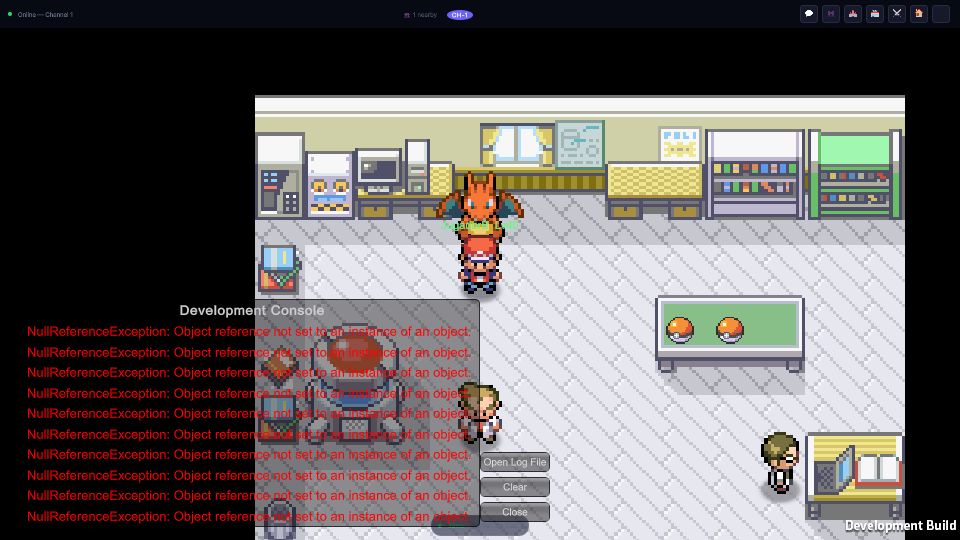
The remote avatar renders with its nameplate (name and level) and its follower monster.
Known limits, stated plainly
- In relayed mode, AOI filtering is client-side. Every position broadcast reaches every client in the map's match; each client discards what is out of range. A modified client can therefore see players farther away than intended. The authoritative transport (the default) does not have this limit: the server sends each client only what it may see. The evidence below was recorded on the relayed transport.
- A standing player broadcasts once. Position is sent on change plus a periodic refresh, so a player who never moves announces once. Any receiver that discards that first packet has no second chance — which is exactly how the origin bug survived.