Battle System Architecture
MCE's battle system is built on a modular component architecture. The BattleManager sits on one GameObject together with 15 specialized modules, each responsible for a single aspect of combat. A BattleStateMachine drives the turn loop, and the entire system is wired together via Zenject dependency injection.
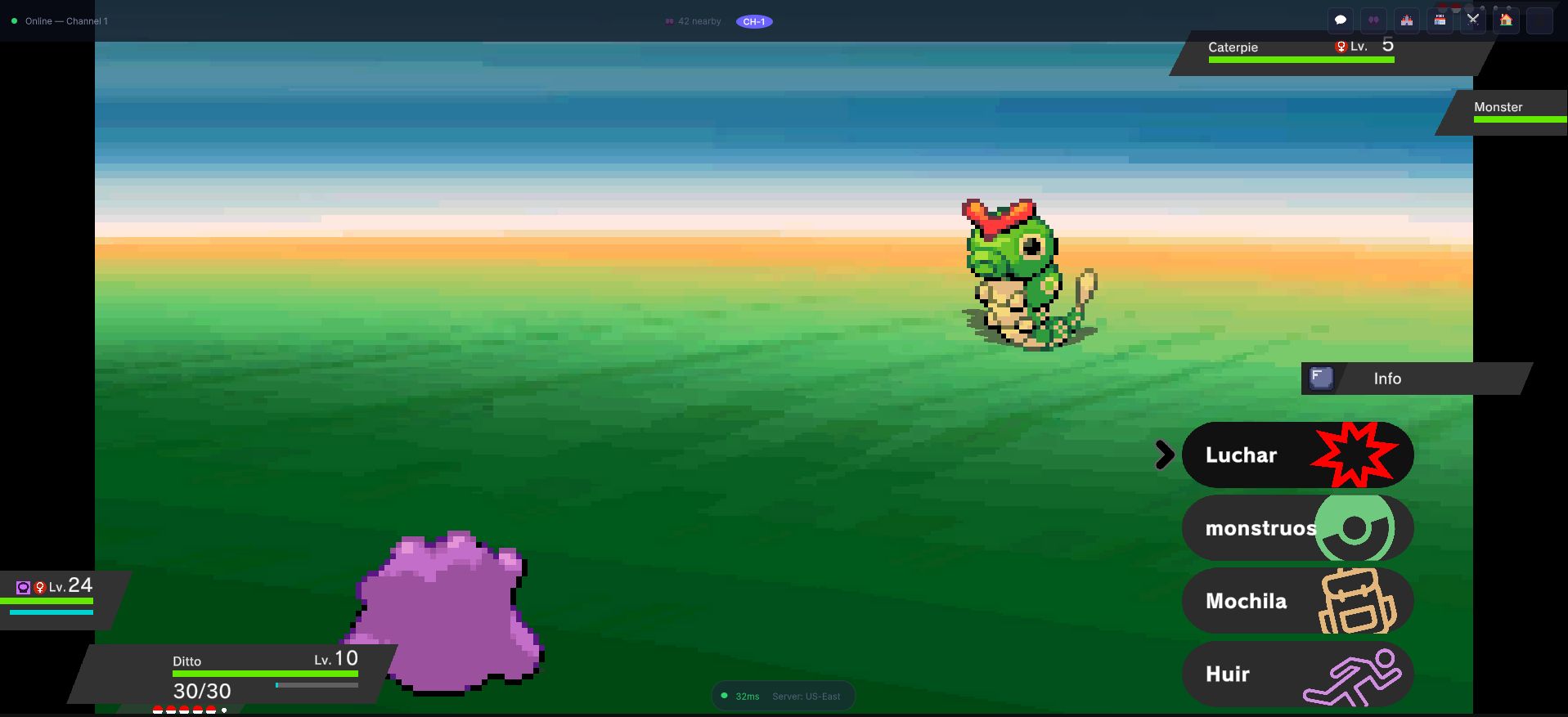
Everything on that screen is a different module reporting: the two health bars, the action
menu, the sprites and their entry animation, and the turn order that decided who moves first.
The BattleManager owns none of it directly -- it asks each module in turn and the battle
loop decides what comes next.
Architecture Overview
BattleLauncher (ScriptableObject, loads the battle scene)
  └─ BattleManager (orchestrator, on the battle scene's GameObject)
       ├─ BattleStateMachine (turn loop)
       ├─ BattleManagerBattlersModule (battler lookup, sprites, forms)
       ├─ BattleManagerHealthModule (HP, fainting)
       ├─ BattleManagerMovesModule (move execution)
       ├─ BattleManagerItemsModule (in-battle items)
       ├─ BattleManagerCaptureModule (catch mechanics)
       ├─ BattleManagerAIModule (enemy decisions)
       ├─ BattleManagerAnimationModule (intro and flow animations)
       ├─ BattleManagerAudioModule (music, SFX)
       ├─ BattleManagerStatusesModule (burn, poison, sleep, field effects...)
       ├─ BattleManagerBattlerStatsModule (stat stages)
       ├─ BattleManagerBattlerSwitchModule (party switching)
       ├─ BattleManagerRostersModule (party management)
       ├─ BattleManagerScenariosModule (weather, terrain, scenario setup)
       ├─ BattleManagerMegaModule (Mega Evolution)
       └─ BattleManagerCharactersModule (trainer characters and sprites)
BattleManager
The BattleManager is the central coordinator. It does not contain battle logic itself -- instead, it delegates to its modules. Its responsibilities are:
- Initializing all modules when a battle begins.
- Providing a shared reference point for inter-module communication (each module reaches its siblings through it).
- Receiving commands from the UI (player actions) and the AI (enemy actions).
- Signaling battle start and end events.
The BattleManager implements IBattleManager. It exposes the BattleType (SingleBattle or DoubleBattle) and the EnemyType (Wild or Trainer) of the battle in progress. See the BattleManager API for its members.
BattleStateMachine
The BattleStateMachine is one coroutine loop. Each turn it:
Update which battlers have fought
  → Request actions (the player's menu, the AI of every other roster)
  → Determine the order (move priority, then speed)
  → Perform the actions
  → After-turn callbacks (before and after the status countdown)
  → Status countdown (weather, burn, poison...)
  → Check and process fainted battlers (XP, replacements)
  → [next turn]
until IsBattleOver. Then it plays the end animation, hands out the prize money (or takes the defeat money), and runs the end-of-battle callbacks. When a battle is server-authoritative (MCE Online) the turn is resolved by the server instead of locally: the loop sends the actions and shows what comes back.
Battle Modules Deep Dive
BattleManagerBattlersModule
Manages the Battler instances for both sides. A Battler extends MonsterInstance with the in-battle state:
- Stat stages (
StatStage,BattleStatStage), critical stage, substitute, volatile statuses. - The list of battlers it fought, items consumed, the last move it used and received.
- Effective stats (base + IVs + EVs + nature + stat stages) through
MonsterMathHelper.
BattleManagerHealthModule
Handles all HP changes through ChangeLife (damage and healing, with the hit animation and sound), and the detection and processing of fainted battlers.
BattleManagerMovesModule
Executes moves (PerformMove): accuracy and evasion checks, the move's effects and animation. The damage itself is computed by the move (DamageMove) using the formula in Moves.
BattleManagerItemsModule
In-battle item usage -- healing items, status cures, X items -- consumed from the player's bag. Trainers get their own Bag.
BattleManagerCaptureModule
Wild monster capture (TryCaptureMonster):
- Catch rate calculation based on the species' catch rate, current HP, status condition and ball (
BattleUtils.CalculateShakeProbability). - The ball shake animation, with several shake checks before the capture or the escape.
- Adds the caught monster to the player's party or storage.
BattleManagerAIModule
Holds one pluggable BattleAI strategy per roster:
- Receives the current battle state.
- Returns a
BattleAction(use a move, switch, use an item, run). - See Battle AI for the built-in strategies and how to chain or write them.
BattleManagerStatusesModule
Manages every kind of status:
- Status conditions (one at a time per battler): burn, freeze, paralysis, poison, bad poison, sleep.
- Volatile statuses (
VolatileStatus, on a battler): confusion, flinch, trapped, and more. - Side statuses (
SideStatus) and global statuses (GlobalStatus) for effects that cover one side of the field or all of it. The weather and terrain of the battle belong to the scenario (BattleManagerScenariosModule).
Each status applies its effects at the right moment of the turn through TriggerStatusesCountdown and the callbacks around it (e.g. burn damage at turn end, paralysis before a move).
BattleManagerBattlerStatsModule
Handles stat stage modifications:
- Stat stages range from -6 to +6.
- Stages of Attack, Defense, Sp. Attack, Sp. Defense and Speed apply a multiplier: +1 = 1.5x, +2 = 2.0x, ... +6 = 4.0x and -1 = 0.67x, -2 = 0.5x, ... -6 = 0.25x. Accuracy and evasion use their own table.
- Abilities can react to stage changes (the
BattleroffersOnStatChangeandAfterStatChangedhooks).
BattleManagerMegaModule
Mega Evolution support:
- Checks whether the battler's species has a Mega form available (
CanSwitchToMegaForm). - Allows one Mega Evolution per roster per battle.
- Plays the form change and applies the Mega form's data.
BattleManagerCharactersModule
Gives each side its characters: the trainer sprites (BattleTrainerSprite), prize money and defeat money. See Trainer Back Sprites and the Throw for how the player's back is drawn and animated.
Battle Flow Example
Here is what happens when the player selects "Fight" and picks a move:
- Request actions -- The player chooses a move from the move panel while the AI chooses for the other roster.
- Order -- All actions are sorted by move priority, then by Speed (higher goes first, with a random tiebreaker).
- Move execution (for the faster battler):
- Check accuracy -- does the move hit?
- Calculate damage (if damaging):
((2*Level/5+2) * Power * Atk/Def) / 50 + 2 - Apply the factors: number of targets, weather, terrain, critical hit, random roll (0.85-1.0), STAB, type effectiveness, status and the additions of abilities, items and side statuses.
- Apply secondary effects (stat changes, status conditions).
- Move execution (for the slower battler, if still standing).
- After-turn callbacks and status countdown -- Weather and status damage, held item effects, ability triggers.
- Faint processing -- If a battler has 0 HP, process fainting (give XP/EVs, check for evolution) and ask for replacements.
Wild vs Trainer Battles
| Aspect | Wild Battle | Trainer Battle |
|---|---|---|
EnemyType | Wild | Trainer |
| Can capture | Yes | No |
| Can run | Yes, if no fighting enemy is an alpha (CanPlayerRun) | No |
| Prize money | No | Yes |
| AI | The launcher's default AI, unless the battle brings its own | The same |
| Rematch | Random encounter | Scripted (CommandGraph) |
Battle Tower & anonymous trainers
The pause-menu Battle Tower (TowerController) runs an endless PvE progression: it validates the player's team against a TowerRuleSet, launches a battle against a generated AI opponent through IBattleLauncher, and from that battle's own end-callback applies the result and re-launches the next fight — continuing until a loss. See the Secret Bases & Player Gyms guide for the player-facing flow and default balance.
Tower opponents are anonymous: generated from the player's roster references, they carry no CharacterData and no Bag. The battle system tolerates such trainers instead of throwing:
BattleManagerCharactersModuleguards the enemy trainer-sprite set — a nullCharacterDatameans the roster still fights, just without a trainer sprite (and contributes no prize money).BattleManagerItemsModulesubstitutes an emptyBagfor a null enemy bag, so the AI gets a valid, item-less bag.
This is what lets a scene-less, identity-less generated opponent battle exactly like an authored trainer.
Battle Configuration
Two layers configure battles:
- The
BattleConfigurationFile(Create > MCE > Battle > Configuration) holds the player-facing battle settings: the Battle Style and the Battle Animation Speed Up (1 to 8). It is read through theBattleManager.Configurationand it is whereBattleSpeedcomes from. - The
BattleLauncherasset holds the battle scene, the wild and trainer battle music and the Default AI.
Capture-difficulty and experience rules live in the MCESettings asset and the game's global data.
Listening to Battle Events
Without Source Code
The battle launcher is bound in dependency injection and notifies when a battle is launched, is about to unload and ends:
[Inject] private IBattleLauncher battleLauncher;

battleLauncher.SubscribeToBattleLaunched(() => Debug.Log("Battle launched"));
battleLauncher.SubscribeToBattleEnded(result => Debug.Log($"Battle ended, won: {result.PlayerWon}"));
IBattleSystem (engine.Battle, with OnBattleStarted and OnBattleEnded) is the SDK's own contract, but the engine does not feed it yet: see IBattleSystem.
With Source Code (Source and Studio Editions)
With source access you can subscribe through BattleManager.SubscribeToBattleInitialized and SubscribeToBattleFinished, or add your own module next to the BattleManager (see Battle Internals).