Menu System
The menu system is built on the MenuSelector component -- a generic, reusable controller that handles cursor navigation, input, audio, and selector arrows for any list or grid of buttons. Every in-game menu (pause menu, battle menu, shop, dex, options, etc.) inherits from it.
Three screens, one component. What follows is the same MenuSelector in three different shapes:
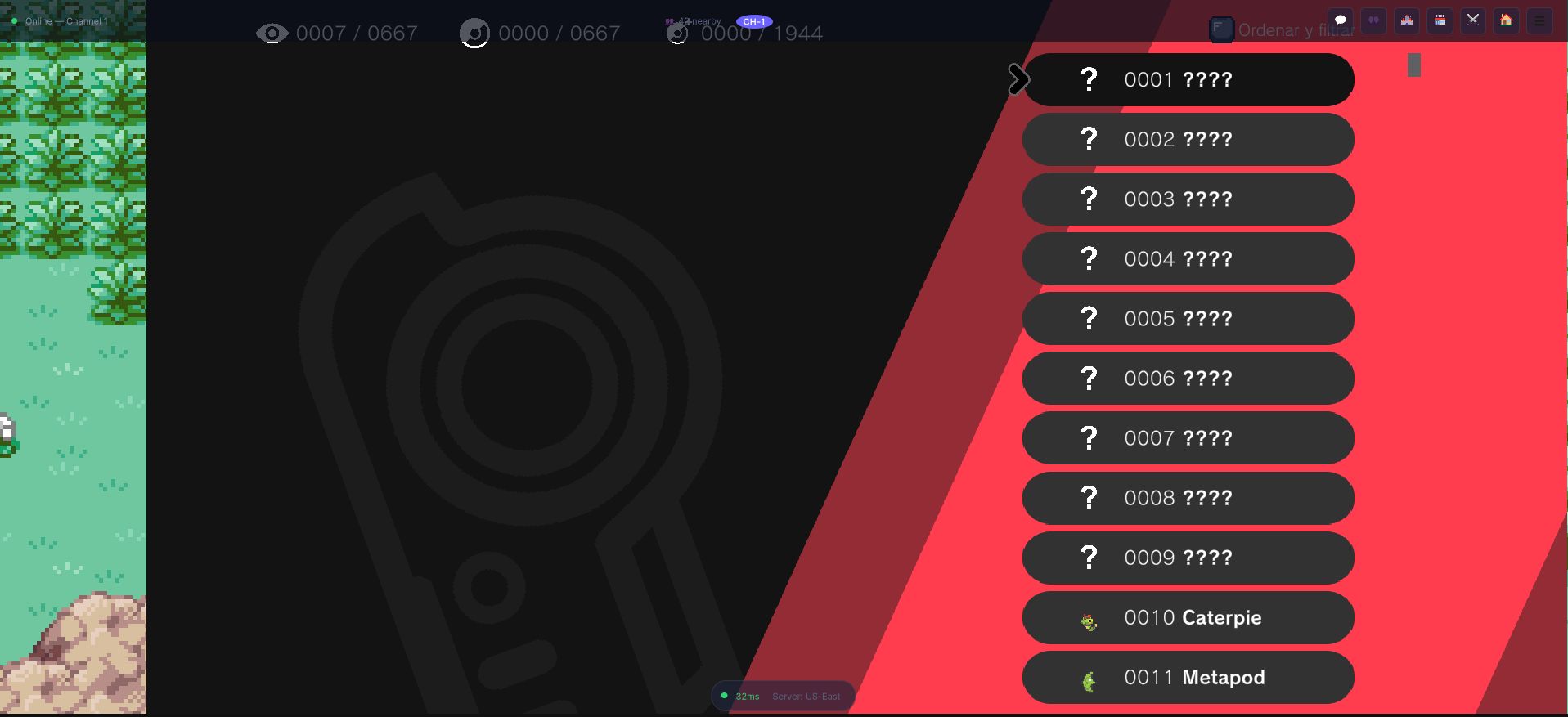
A long virtualised list. The counters across the top are seen / caught / forms, and the ????
rows are species the player has not observed yet — the entries exist, the names do not, because
in an online world it is the server that decides what you have seen.
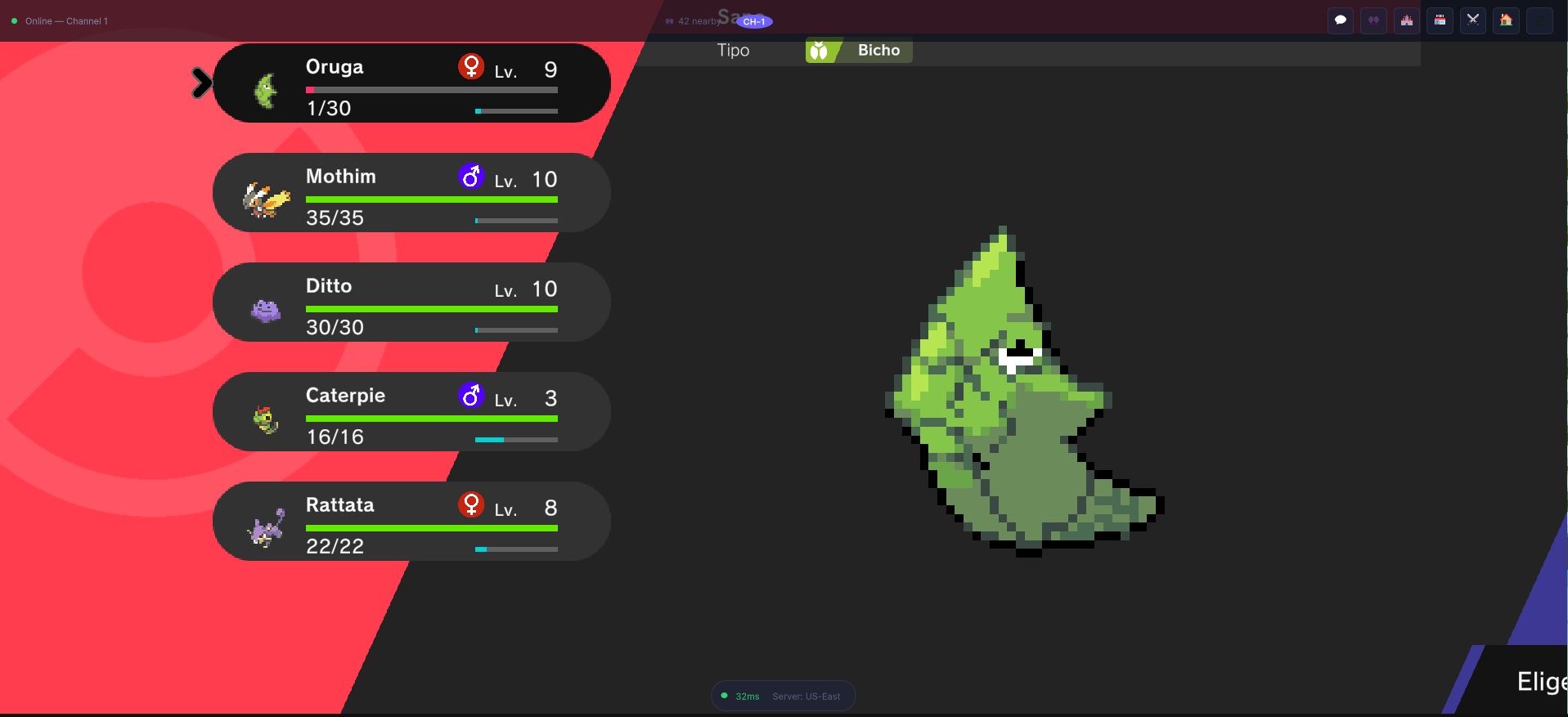
Six fixed slots instead of a list, with the cursor moving in two dimensions.
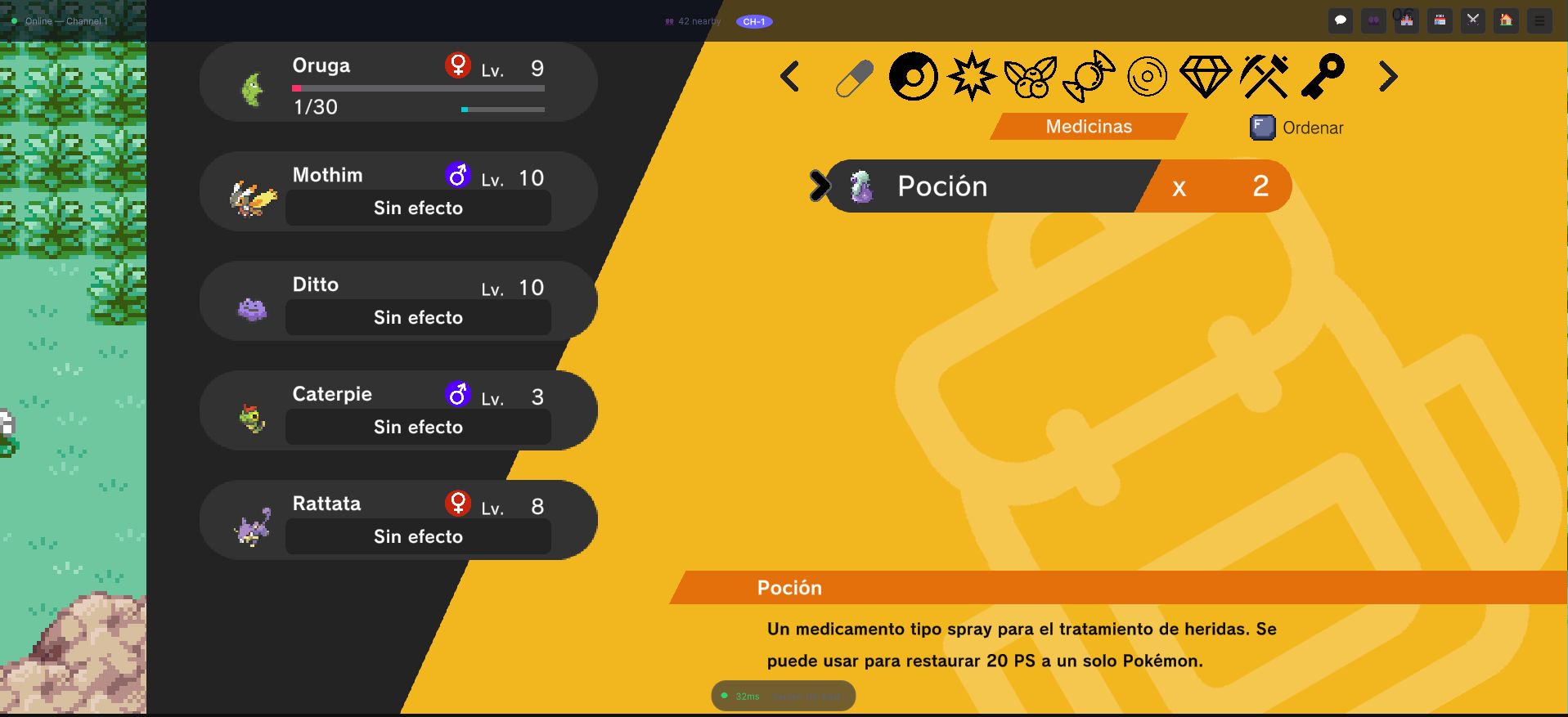
Two selectors side by side — the category strip along the top and the item list under it — plus a third for the party on the left, where entries that would do nothing read "Sin efecto" rather than being hidden. A button that is visible and refuses is easier to learn than one that vanished.
MenuSelector
Location: Assets/OpenMon/Core/Runtime/UI/MenuSelector.cs
Namespace: OpenMon.MCE.UI
MenuSelector extends HidableUiElement<MenuSelector> and implements IInputReceiver. It manages a list of MenuItem children and provides:
- Vertical or horizontal navigation
- Wrap-around cursor movement
- Animated selector arrow (MCE's bundled tween API -- no third-party asset needed)
- Hold-to-scroll for fast navigation
- Audio feedback on move and select
- Events for selection, hover, and back
Key Serialized Fields
[SerializeField] protected int DefaultSelected;          // Starting cursor position
[SerializeField] private bool RequestInputOnShow = true;  // Auto-request input focus
[SerializeField] protected Navigation MenuNavigation;     // Vertical or Horizontal
[SerializeField] protected bool InvertedControls = true;  // Invert nav direction
[SerializeField] private bool HideWhenChosen = true;      // Auto-hide on select
[SerializeField] private bool NoChoosing;                  // Browse-only mode
[SerializeField] public bool NoGoingBack;                  // Disable back button
[SerializeField] public bool ShowSelectorArrow = true;     // Show animated arrow
[SerializeField] public bool CanHoldToScrollFaster;        // Hold-to-repeat
[SerializeField] public float HoldNavigationInterval;      // Repeat rate (seconds)
public List<MenuItem> MenuOptions = new();                 // The button list
Events
| Event | Type | Fires When |
|---|---|---|
OnButtonSelected | Action<int> | Player confirms a selection (index of chosen item) |
OnHovered | Action<int> | Cursor moves to a new item |
OnBackSelected | Action | Player presses the back/cancel button |
Lifecycle
Show(true)
  └─ RequestInput() ──► IInputManager pushes this onto the input stack
  └─ OnStateEnter()
       ├─ Instantiates selector arrow prefab
       ├─ Starts HoldNavigation coroutine
       └─ Selects DefaultSelected after one frame

Show(false)
  └─ ReleaseInput() ──► IInputManager pops this from the input stack
  └─ OnStateExit()
       ├─ Stops HoldNavigation coroutine
       ├─ Deselects current item
       └─ Destroys selector arrow
Navigation Flow
When the player presses a direction:
OnNavigation()reads the input vector and extracts the relevant axis (Y for vertical, X for horizontal).Navigate()increments or decrements the selection index, wrapping around at boundaries.- Non-interactable buttons are skipped automatically.
Select()is called on the new index, which:- Deselects the previous item
- Plays navigation audio
- Updates
CurrentSelection - Moves the selector arrow with the
OpenMon.Foundation.TweeningAPI - Fires
OnHovered - Calls
MenuItem.OnSelect()on the new button
// Simplified navigation logic
protected virtual void Navigate(float input)
{
    if (InvertedControls) input *= -1;

    int newSelection = CurrentSelection;

    // Find next interactable item, wrapping around
    switch (input)
    {
        case > 0: newSelection = (newSelection + 1) % MenuOptions.Count; break;
        case < 0: newSelection = (newSelection - 1 + MenuOptions.Count) % MenuOptions.Count; break;
    }

    Select(newSelection);
}
Hold-to-Scroll
When CanHoldToScrollFaster is true, holding the navigation input triggers repeated Navigate() calls at the HoldNavigationInterval rate. This uses a persistent coroutine:
protected IEnumerator HoldNavigation()
{
    while (true)
    {
        if (Holding) Navigate(LastInput);
        yield return new WaitForSeconds(HoldNavigationInterval);
    }
}
MenuItem
Location: Assets/OpenMon/Core/Runtime/UI/MenuItem.cs
Each button in a MenuSelector is a MenuItem -- a HidableAndSubscribableButton with:
ArrowSelectorPosition-- aTransformchild that defines where the selector arrow should land.ToggleIgnoreLayout-- when true, hiding the item also removes it from layout calculations viaLayoutElement.ignoreLayout.OnSelect()/OnDeselect()-- called by the parentMenuSelectorto trigger Unity'sEventSystemselection state.
public class MenuItem : HidableAndSubscribableButton
{
    public Transform ArrowSelectorPosition;

    public virtual void OnSelect()
    {
        EventSystem.current.SetSelectedGameObject(null);
        Button.Select();
    }

    public virtual void OnDeselect() => Button.OnDeselect(null);
}
ScrollableMenuSelector
Location: Assets/OpenMon/Core/Runtime/UI/ScrollableMenuSelector.cs
For menus that are taller than the viewport (e.g. a long list of moves or items), ScrollableMenuSelector overrides Select() to auto-scroll the parent ScrollRect:
public override void Select(int index, bool playAudio = true, bool updateArrow = true, bool force = false)
{
    base.Select(index, playAudio, false, force);
    UpdateScroll();                      // Scroll to keep selection visible
    UpdateSelectorArrowPosition();       // Then reposition the arrow
}

private void UpdateScroll()
{
    if (MenuOptions.Count < 2) return;
    Scroll.verticalNormalizedPosition = 1 - (float)CurrentSelection / (MenuOptions.Count - 1);
}
VirtualizedMenuSelector
Location: Assets/OpenMon/Core/Runtime/UI/VirtualizedMenuSelector.cs
For very large lists (hundreds of items, the Dex, PC storage), VirtualizedMenuSelector<TData, TButtonController, TButtonFactory> uses object pooling to recycle a small set of button instances as the player scrolls:
- A fixed number of
TButtonControllerinstances are created (enough to fill the viewport plus a small buffer). - As the
ScrollRectscrolls, off-screen items are repositioned and repopulated with new data. - The abstract method
PopulateChildData(TButtonController child, TData data)must be implemented by subclasses to bind data to each recycled button.
// Setting data on a virtualized menu
public void SetButtons(List<TData> newData, bool clearPrevious = true)
{
    Data = newData;
    RowCount = Data.Count;
    Refresh(clearPrevious);
}
Button instances are created through a Zenject GameObjectFactory<TButtonController>:
[Inject] private TButtonFactory buttonFactory;

// Inside CheckChildItems():
childItems[i] = buttonFactory.CreateUiGameObject(Content);
Example: SavegameButton
public class SavegameButton : VirtualizedMenuItem
{
    [SerializeField] private TMP_Text Text;

    public void SetSaveName(string nameToSet) => Text.SetText(nameToSet);

    public class Factory : GameObjectFactory<SavegameButton> { }
}
Game Screens
Main Menu (Title Screen)
Location: Assets/OpenMon/Core/Runtime/UI/MainMenu/
The title screen provides New Game, Continue (load), Credits. The load screen uses a VirtualizedMenuSelector with SavegameButton items to display saved games.
In-Game Pause Menu
Location: Assets/OpenMon/Core/Runtime/UI/GameMenu/GameMenuScreen.cs
GameMenuScreen extends MenuSelector and slides in/out with tween animations. It routes selections through a ButtonSelected(int index) switch with 12 slots — the original 8 plus three buildable-content entries (cases 9–11). Slot 8 is not in use and stays hidden, so the other entries keep their indices:
| Index | Entry | Action |
|---|---|---|
| 0 | Dex | DialogManager.ShowDexScreen(...) |
| 1 | Monsters | DialogManager.ShowPlayerRosterMenu(...) |
| 2 | Bag | DialogManager.ShowBag(...) |
| 3 | Map | MapSceneLauncher.ShowMap(...) |
| 4 | Quests | DialogManager.ShowQuestsScreen(...) |
| 5 | Profile | DialogManager.ShowProfileScreen(...) |
| 6 | Options | DialogManager.ShowOptionsMenu() |
| 7 | Exit | Prompts save, then quit or return to title |
| 9 | Battle Tower | EphemeralTowerLauncher.Launch(diContainer, playerCharacter) — endless, ephemeral run |
| 10 | My Base | EnterOrDecorateSecretBase() — enter the interior, or open the decorate palette when inside |
| 11 | My Gym | EnterOrManageGym() — enter the player's gym, or decorate/manage when inside |
The three new entries are localized (Spanish labels Torre de Batalla / Mi Base / Mi Gimnasio in-source) and gated by availability — each is a safe no-op until its authoring slot is wired in the menu prefab:
| Entry | Availability gate (serialized on GameMenuScreen) |
|---|---|
| Battle Tower (case 9) | the player has a non-empty PlayerRoster |
| My Base (case 10) | secretBaseInteriorScene (a SceneInfoAsset) assigned; otherwise enter is skipped |
| My Gym (case 11) | gymInteriorScene (a SceneInfoAsset) assigned; otherwise enter is skipped |
Cases 9–11 are dependency-injected: diContainer construct-injects the ephemeral tower, and teleporter (PlayerTeleporter) warps the player into the base/gym interior. Before any entry that takes over the screen, CloseMenuForOverworldAction() mirrors the OnBack teardown so the overworld is not left frozen behind the battle/scene.
The menu supports quick-save via OnExtra2 and can be toggled with both Back and the dedicated Menu key (OnExtra1).
// Opening the game menu
DialogManager.ShowGameMenu(onButtons, playerCharacter, onBack);
Button visibility is controlled through UpdateLayout(List<bool>) -- pass a list of booleans to show/hide specific entries (e.g. hide Dex before the player gets it).
For the gameplay behind the three new entries, see the Secret Bases & Player Gyms guide.
Options Screen
Location: Assets/OpenMon/Core/Runtime/UI/Options/
Exposes game settings as MenuSelector-based controls:
- Volume sliders (Global, Music, FX) via
VolumeSlider/TweenableSlider - Resolution, fullscreen mode, monitor selection
- Language selection
- Gameplay: battle speed, battle style, difficulty, catch difficulty, run mode
- Auto-save toggles, save format, nickname display
Battle UI
Location: Assets/OpenMon/Core/Runtime/UI/Battle/
The battle HUD uses standalone MenuSelector subclasses (not routed through DialogManager):
MainBattleMenu-- Fight / Bag / Monster / Run with quick-throw last ball (OnExtra2).BattleMoveMenuSelector-- 4-move grid.TargetMonstersMenuSelector-- Target picker for multi-battles.BattleInfoPanel-- Detailed stat/type info overlay.
Adding a Custom Menu
- Create the prefab with a
MenuSelector(or subclass) at the root andMenuItemchildren for each button. - Set the
ArrowSelectorPositionon eachMenuItemto a child Transform where the arrow should appear. - Configure
MenuNavigation(Vertical/Horizontal), audio references, and arrow prefab in the Inspector. - Subscribe to events in your controller:
public class MyCustomMenu : MonoBehaviour
{
    [SerializeField] private MenuSelector menu;

    private void OnEnable()
    {
        menu.OnButtonSelected += OnItemChosen;
        menu.OnBackSelected += OnBack;
    }

    private void OnItemChosen(int index)
    {
        // Handle selection
    }

    private void OnBack()
    {
        // Close menu
    }
}
- For large lists, inherit from
VirtualizedMenuSelector<TData, TButton, TFactory>, implementPopulateChildData(), and register your button factory inUIElementsInstaller.